


 ██████╗  ██████╗  ██████╗███╗   ███╗     ██████╗██╗     ██╗
 ██╔══██╗██╔═══██╗██╔════╝████╗ ████║    ██╔════╝██║     ██║
 ██████╔╝██║   ██║██║     ██╔████╔██║    ██║     ██║     ██║
 ██╔══██╗██║   ██║██║     ██║╚██╔╝██║    ██║     ██║     ██║
 ██║  ██║╚██████╔╝╚██████╗██║ ╚═╝ ██║    ╚██████╗███████╗██║
 ╚═╝  ╚═╝ ╚═════╝  ╚═════╝╚═╝     ╚═╝     ╚═════╝╚══════╝╚═╝

        Local AI on AMD GPUs — one install, zero setup
ROCm CLI is a command-line tool for setting up and running local AI on AMD GPUs, with a full-screen terminal user interface (TUI) dashboard for GPU telemetry, model serving, and chat.
It ships as prebuilt binaries (rocm and rocmd) for Linux and Windows
(x86_64), needs no Python, Rust, or existing ROCm install, and includes
inference engine adapters for Lemonade and vLLM.
| Platform | Prebuilt binary | Notes |
|---|---|---|
| Linux (x86_64) | Yes | Ubuntu 24.04 or newer; full support, including the live dashboard and both inference engines |
| Windows (x86_64) | Yes | CLI and Lemonade serving; live dashboard shows GPU/CPU/memory and running managed servers, without per-server throughput; no vLLM |
| WSL2 (x86_64) | Yes (Linux binary) | Ubuntu 24.04 or newer; full support, including the live dashboard |
| macOS | No | No official installer, release, CI, or QA coverage |
For WSL2 setup and diagnosis, see docs/wsl.md.
Live dashboard telemetry works on Windows too: GPU/CPU/memory and the managed
servers rocm services list reports. Per-server throughput and Docker-discovered
instances need the rocmdashd unix socket, so they're Linux/WSL2 only (see
Interactive interfaces). vLLM
serving is Linux or WSL2 only (see docs/vllm.md).
The minimum supported Linux release, native or under WSL2, is Ubuntu 24.04. On
other distributions the equivalent requirement is glibc 2.38 with
GLIBCXX_3.4.32, and OpenSSL 3.0.0 or newer (libssl.so.3): that is what the
Lemonade engine is linked against. Every stable Lemonade release from 11.5.1
through 2026.44.1, the one ROCm CLI pins, needs those versions. Lemonade
2026.45.3 needs glibc 2.43 and OpenSSL 3.2.0, which is why it is not pinned.
Ubuntu 22.04 ships glibc 2.35 and cannot run the Lemonade engine; Ubuntu 24.04
provides glibc 2.39, GLIBCXX_3.4.33 and OpenSSL 3.0.13.
On an older host, rocm engines install lemonade stops before downloading
anything and says what falls short: the glibc version Lemonade needs and the
newest the host's libc.so.6 provides, or that the host has no libssl.so.3,
the library of OpenSSL 3. That check reads glibc and OpenSSL only;
GLIBCXX_3.4.32 (libstdc++) is not checked. Where Lemonade is already
installed, the same check refuses to reinstall it or start it, and says the
installed copy was left as it is.
The check reads the ldconfig cache. A host that provides these libraries some
other way (LD_LIBRARY_PATH, a Nix or Guix profile) can set
ROCM_CLI_DISABLE_LEMONADE_HOST_LIBRARY_CHECK=1: the shortfall is then printed
as a warning and Lemonade goes ahead.
Important
Tech Preview: This software is provided as-is, without warranty or guarantee of stability. APIs, commands, and behavior might change without notice. Intended for experimentation and early feedback only.
ROCm CLI exists to make an AMD GPU the easiest place to run AI, not the hardest. These are the goals we build toward. As a Tech Preview the tool does not meet all of them yet; where it falls short, that is a bug to fix, not a different goal.
- From bare metal to inference in minutes. A fresh machine with an AMD GPU should get to a served model in a few commands and a few minutes (see Driver installation and Configure ROCm and serve a model). A step that needs a manual workaround is a gap in the tool, not homework for the user.
- Every AMD GPU, with an honest answer. We aim to support the whole AMD line: Instinct accelerators in the datacenter, Radeon cards on the desk, and Ryzen AI APUs such as Strix Halo in laptops and mini-PCs, on Linux, Windows, and WSL2. Where we know a GPU has no ROCm build, we say so rather than install one meant for a different GPU.
- Rock solid. Correctness comes before features. We test on real AMD hardware and review new user-visible behavior against an executable scenario. Releases are checksummed and signed, and the install scripts verify what they download. A failure partway through should never leave your system half-changed.
- The GPU or nothing. There is no CPU fallback. If a model cannot run
on your GPU, serving fails rather than quietly running it somewhere
slower. Use
rocm diagnose --modelto check before you download. - Your machine, your call. Nothing you have should disappear without
your say-so.
rocm uninstall,rocm runtimes uninstalland therocm storageremovals show the plan and ask first, and--yesgives that approval in advance for scripts. - When it breaks, it tells you how to fix it.
rocm diagnoseandrocm fixmatch known failures against a catalog with a stable id for each. Where a fix is safe to automate,rocm fixapplies it after asking. Otherwise it prints the steps to take, or says plainly that no fix exists. You do not have to wait for it to break:rocm diagnosechecks the machine as it is and installs nothing, and no fix is applied until you runrocm fix. - Built for people, scripts, and agents alike. A launcher and a live
dashboard for people,
--jsonoutput fromexamine,diagnose,fixand other inspection commands for scripts, and therocm-doctorskill so AI agents can diagnose and repair a setup with the samerocm diagnoseandrocm fixcommands a person would. - Open by default. MIT-licensed and developed in the open, with its documentation kept in the same repository as the code it describes.
- Extensible, from local to remote. ROCm CLI should grow with the
open-source ecosystem, adopting new inference engines, ROCm-based
libraries, and tooling for safe, scalable agentic AI (such as agent
sandboxing and fleet orchestration) as supported, validated extensions. It
should also take you from your own machine to remote GPU compute without
switching tools;
rocm remote(preview) is the first step there.
Inspect the environment, discover engines and models, find a running service, and chat with a locally served model:
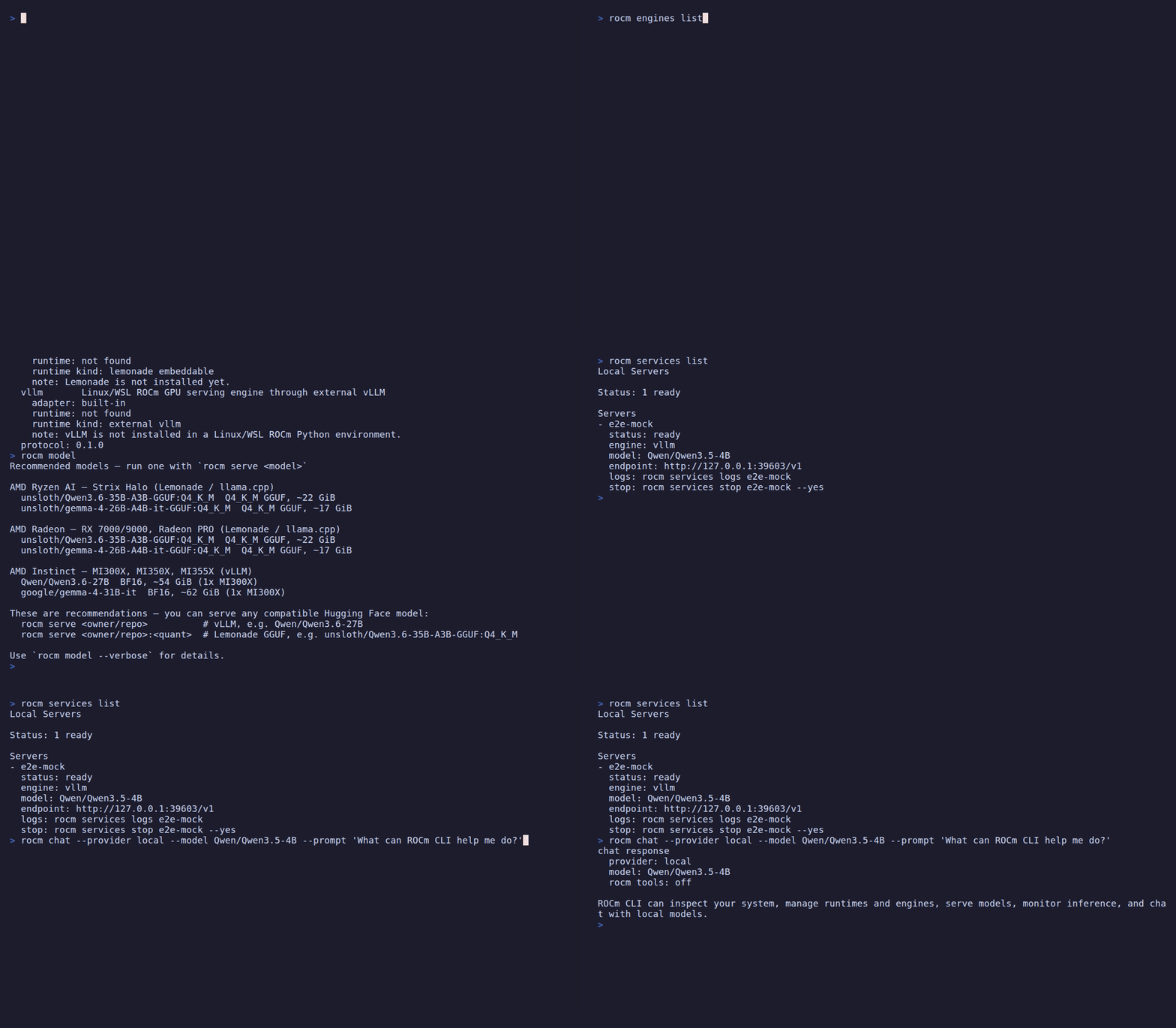
Explore simulated GPU telemetry, model serving, and offline chat in the full-screen Console:

The installer downloads a prebuilt bundle, verifies its SHA-256 checksum and
its detached signature against the release public key pinned in the installer,
installs the rocm and rocmd binaries into ~/.local/bin, and adds that
directory to your shell PATH.
On Linux, when fish is installed (fish is on PATH, or fish's config folder
already exists), the installer also adds that directory to PATH in fish's
config.fish and installs fish completions. It does this even when the login
shell is bash, zsh, or ksh. Fish's config folder is $XDG_CONFIG_HOME/fish
when that variable is an absolute path, else ~/.config/fish. A
completions/rocm.fish that is already there and that the installer did not
write (your own file, or a link) is left as it is: the installer prints a note
that completions were not installed, and rocm uninstall leaves it too.
Setting ROCM_CLI_UPDATE_SHELL_PATH=0 skips every shell profile, fish's and
its completions included. Rerun the installer any time to upgrade.
rocm uninstall removes the binaries and the fish completions the installer
wrote for them, and undoes the PATH change too when no other program lives
in that directory.
curl -fsSL https://raw.githubusercontent.com/ROCm/rocm-cli/main/install.sh | shThis tracks the default release channel. For nightly builds, pass the
nightly channel instead:
curl -fsSL https://raw.githubusercontent.com/ROCm/rocm-cli/main/install.sh | sh -s -- nightlyThe channel here is the one the rocm binary comes from. It is separate from
the ROCm SDK channel: rocm install sdk --channel release|nightly picks which
TheRock stream the SDK comes from, whichever channel installed the binary.
irm https://raw.githubusercontent.com/ROCm/rocm-cli/main/install.ps1 | iexThis tracks the default release channel. For nightly builds, set
ROCM_CLI_CHANNEL to nightly first:
$env:ROCM_CLI_CHANNEL = "nightly"
irm https://raw.githubusercontent.com/ROCm/rocm-cli/main/install.ps1 | iex
As on Linux, this is the binary's channel only. The ROCm SDK channel is chosen
separately with rocm install sdk --channel.
CI builds a bundle for each pull request that changes code, and the installers
can install it by pull request number. The pull request's CI run shows the
exact command on its summary page, under "Try this PR's build". This needs the
GitHub CLI signed in (gh auth login, or
GH_TOKEN set), because GitHub only serves workflow artifacts to signed-in
users.
curl -fsSL https://raw.githubusercontent.com/ROCm/rocm-cli/main/install.sh | sh -s -- pr-1234$env:ROCM_CLI_CHANNEL = "pr-1234"
irm https://raw.githubusercontent.com/ROCm/rocm-cli/main/install.ps1 | iex
Remove-Item Env:ROCM_CLI_CHANNELThe installer installs the build of the pull request's latest commit and
prints the commit and the CI run it came from, with the run's result. Whether
a failed run still has a build depends on the platform: the Linux build is a
separate job, so a failing test elsewhere in the run leaves it in place, but a
failure in the lint or formatting checks that gate it leaves none, and the
Windows build is packaged after that job's install lifecycle checks, so a
failure there leaves none either. Builds are unsigned and unreviewed, so only the download's checksum is
verified, and asking for a signature (ROCM_CLI_REQUIRE_SIGNATURE=1, or a
signing key) fails instead of being skipped. They are kept for 7 days, so an
older pull request needs a new push or a re-run. ROCM_CLI_GITHUB_REPO points
the lookup at a fork. ROCM_CLI_DOWNLOAD_BASE cannot be combined with a pull
request channel in either installer, nor can ROCM_CLI_ARCHIVE or
ROCM_CLI_DOWNLOAD_ONLY in install.sh, the only one that has them.
Open a new terminal so the updated PATH takes effect, then run:
rocm versionThe output shows the ROCm CLI version with its release tag or branch and commit
hash (a release build leads with its release version, such as
0.3.0 (v0.3.0, 07f72bb); a build from main leads with 0.0.0-dev), the ROCm
SDK that ROCm CLI would use on this computer, and the GPU driver version. A
successful install prints the CLI version line. The SDK and driver lines read
not detected when none is found, which is expected on a computer where you
haven't installed ROCm or a driver yet.
If your shell can't find the rocm command, for example with
rocm: command not found, confirm that the install directory is on your PATH.
The directory is ~/.local/bin on Linux, %USERPROFILE%\.local\bin on Windows,
or the folder you set with ROCM_CLI_INSTALL_DIR.
Building requires Rust; the pinned toolchain in
rust-toolchain.toml (currently 1.96.0) installs automatically through rustup.
git clone https://github.com/ROCm/rocm-cli
cd rocm-cli
cargo build --release
This produces the two binaries under target/release/:
rocm: the CLI and interactive interfacesrocmd: the background daemon: it runs the watchers and the managed-service supervisor, and serves the MCP tools (the dashboard's telemetry daemon runs insiderocm dashitself, not inrocmd)
Run without installing:
cargo run --release --bin rocm -- examineOr copy the release binaries onto your PATH:
install -m 0755 target/release/rocm target/release/rocmd ~/.local/bin/See CONTRIBUTING.md for the full development setup, test commands, and commit-signing requirements.
This quickstart takes you from installing ROCm CLI to getting a chat reply from
a model served on your GPU. You need a computer with a supported AMD GPU running
Linux, WSL2, or Windows. The first run involves large downloads:
rocm install sdk fetches a ROCm runtime and a PyTorch stack, and rocm serve
fetches a model of a few GB. Allow extra time and disk space.
Follow these steps:
-
Install ROCm CLI with the command for your platform in Installation. Then open a new terminal and confirm that
rocm versionprints the CLI version. -
Check the GPU, the ROCm runtime, and the serving engine:
rocm examineTwo lines in the output decide the next steps. For example, on a Radeon or Ryzen AI GPU:
  active_runtime_status: ready
  effective_default_engine: lemonade
On an Instinct GPU, the second line reads
effective_default_engine: vllminstead. vLLM isn't available on native Windows, so Windows always useslemonade. The lines mean:active_runtime_status:readymeans a managed ROCm runtime is already active, so you can skip step 3.effective_default_engine:lemonadeorvllm. The engine decides which model you serve in step 4.
-
Install a managed ROCm runtime:
rocm install sdkThis downloads TheRock ROCm wheels and a matching PyTorch stack into a managed environment. Run
rocm examineagain and confirm thatactive_runtime_statusreportsready. -
Serve a model in the form your engine accepts:
-
lemonade(Ryzen AI and Radeon GPUs) serves GGUF models:rocm serve qwen -
vllm(Instinct GPUs) serves safetensors models:rocm serve Qwen/Qwen2.5-1.5B-Instruct
The server runs in the background. When it's ready,
rocm serveprints a deployment summary with the endpoint, the service ID, and the commands that stop the service and show its logs. -
-
Send the model a prompt. Pass the same model name you served:
rocm chat --provider local --model qwen --prompt "Explain ROCm in one sentence"On a
vllmengine, use--model Qwen/Qwen2.5-1.5B-Instruct. To open the interactive chat instead, runrocm chatwith no options. Chat is a preview feature. -
Stop the server with the
stopcommand from the deployment summary. It has this form:rocm services stop <service-id> --yesTo find the service ID later, run
rocm services list.
For other models and engine options, see Configure ROCm and serve a model and Model serving.
Launch ROCm CLI with no arguments:
rocm
With no arguments on an interactive terminal, rocm opens the launcher, a
small front-door menu that gets you to the common tasks:
- Set up this system: install or update ROCm
- Serve a model: run a model on your GPU
- Diagnose & fix: check GPU, driver, and ROCm
- Chat: talk to a local or API-backed model
- Open full dashboard →: escalate into the live dashboard (
rocm dash)
Pick a row with the arrow keys and Enter. Press q or Ctrl-C to quit.
Ctrl-C quits from the launcher and the dashboard alike and restores your
terminal.
The one exception is the dashboard's console for a running job, where
Ctrl-C keeps its existing meaning of "cancel this job" and does not quit. Once
that job finishes, Ctrl-C quits there too.
If a model is still being served, quitting asks for confirmation first. This
covers q, the Esc menu's Quit row, and /quit or /exit in chat, from the
launcher or from a dashboard or chat session opened directly.
The prompt names the model and the rocm services stop <id> --yes command to
stop it. From the dashboard, press s instead to jump straight to the Services
overlay and stop it there.
At the prompt:
- Decline (
nor Esc) to return to where you were. - Confirm (
yor Enter) to quit anyway. The model keeps running in the background.
Unlike q, Ctrl-C always quits immediately without asking, with the same
running-job exception as above. See
Developer manual QA
for the Windows and launcher-hosted-session details.
On a non-interactive terminal (or piped output), rocm prints a one-shot status
summary instead of opening the launcher.
rocm ships two terminal UIs built on ratatui:
The lightweight hub described above. It runs the guided Set up, Serve, Diagnose, and Chat flows in place, and hands off to the full dashboard when you need live instruments. This is the default surface for everyday use; the legacy full-screen setup assistant has been retired.
The full-screen telemetry dashboard shows every instrument and action on one screen.
On Linux/WSL it runs its telemetry daemon inside the dashboard itself, with no
separate service to start. Several dashboards open at once share one daemon,
and when the dashboard running it closes, one that is still open takes it
over, so the others reconnect and keep their chart history. After that
hand-off the GPU figures can stay empty for a while (up to about 15 seconds on
some hosts) while the new daemon detects the GPU again. A dashboard that
reconnects to the same daemon can show up to about 30 recent chart points
twice, a known issue. If the daemon was failing when you quit the dashboard
(it could not start, or stopped serving and had not recovered), and no other
dashboard's daemon is serving by then, the dashboard says why after you quit
it, however you opened it (rocm dash, interactive rocm chat, or the bare
rocm launcher), and also when you end it with Ctrl-C or it gets SIGINT or
SIGTERM. If the dashboard's own supervision of its telemetry daemon crashes,
that is reported even when another dashboard's daemon is serving, when you
quit the dashboard; on Ctrl-C or a signal it is only written to the log
files under the data directory's logs folder, as it happens. The
dashboard presents five tabs (switch with Tab/Shift+Tab or number keys
1–5):
| Tab | What it shows |
|---|---|
| Home | At-a-glance status: GPU, active runtime, running servers |
| ROCm | Guided ROCm and runtime actions with inline details |
| Serving | Start, inspect, and manage model servers |
| Observe | Live GPU utilization, instances, and benchmark telemetry |
| Chat | Assistant chat backed by a local server or configured provider |
Live mode works on Windows too, showing GPU/CPU/memory and the managed servers
rocm services list reports. Per-server throughput and Docker-discovered
instances need the Unix domain socket telemetry, so they are Linux/WSL2 only.
Use rocm dash --demo for a synthetic session that runs
anywhere without a GPU or daemon.
On Linux and WSL, the embedded daemon also discovers loaded models from a
separately running local Lemonade server at 127.0.0.1:13305. Native Windows
has no live dashboard telemetry, so it has no external discovery.
To use another endpoint, set dashboard.daemon.lemonade_host and
dashboard.daemon.lemonade_port in config.json. To disable external
discovery, set dashboard.daemon.enable_lemonade to false. The file is
~/.rocm/config.json, or config.json in the directory named by
ROCM_CLI_CONFIG_DIR. Editing it is the only way to set these fields.
Discovery works as follows:
- A healthy server with no loaded models does not count as a running model.
- Discovery does not register an external server as a managed service or give ROCm CLI ownership of its process.
- External models are visible in Observe, but are excluded from the Services stop/restart controls.
The tok/s figure for a Lemonade model is the rate of the endpoint's most recent completed request, not live throughput: it stays the same while the server is idle. The dashboard explains it in two places:
- A legend (
Lemonade: last req tok/s, not live) under the Instances table and the Services overlay rows. - A
last reqprefix in the instance detail and the quick preview.
Because the figure is not live, the node-wide totals (the tok/W and tok/s heroes
on Home and Observe) and the per-instance tok/W leave it out, and the agent
snapshot marks it with gen_tps_last_request.
A managed Lemonade server that requires an API key stays listed with its registry status and throughput unavailable; the dashboard never reads the key.
The engine pane distinguishes a ROCm CLI-managed Lemonade installation from an
externally running server. When installation detection is unavailable, it shows
an unchecked status ("unknown, run rocm engines list") instead of claiming
Lemonade is not installed. Installation status does not depend on GPU telemetry.
It is read once, when the dashboard starts. After you install Lemonade from the
Engines overlay, restart the dashboard to refresh it.
Before serving a model, check whether a managed ROCm runtime is already configured:
rocm examine
When active_runtime_status reports ready, you can serve a model now. A
machine can also have an existing ROCm install that rocm examine reports as
legacy_rocm_status: detected_unmanaged, alongside the managed runtime. To
install a runtime, or to get a different version or configuration, run:
rocm install sdk
This downloads TheRock ROCm wheels and a matching PyTorch stack into a managed
environment. Running rocm install sdk creates a managed runtime alongside any
legacy install.
Without --version, rocm install sdk installs the newest stable release
from stable.repo.amd.com, and --channel nightly installs the
newest nightly build from nightly.repo.amd.com. Earlier releases stay
installable by pinning them: --version 7.14.1 installs the ROCm 7.14.1 release,
and --channel nightly --build-date 2026-08-19 installs a nightly from before
the nightly channel moved on 2026-08-23. If ROCm CLI can't tell which exact GPU
architecture this computer has, or you want a different one, also add --family with the
raw gfx code from rocm examine. For example: --family gfx1200.
On WSL, wheel runtime installs and updates (rocm install sdk,
rocm update --apply) also link librocdxg.so to the runtime's own
librocdxg.so.1, so the runtime loads its own copy instead of an older host
librocdxg (it also replaces a dangling librocdxg.so). For a runtime
installed earlier, rocm examine prints a wsl_runtime_librocdxg line with the
command that does the same (see
WSL).
Running rocm install sdk when a managed runtime is already the active default
asks first, because the new install takes over as the active default; see
ROCm installation
for that gate, the flags that approve it without a prompt, and the ROCm 10 and
newer requirements.
After the install finishes, serve a model:
rocm serve qwen
qwen is a built-in alias for a small GGUF assistant model, served by the
Lemonade engine on Ryzen AI and Radeon GPUs. On Instinct GPUs, which serve
through vLLM, pass a safetensors model instead, such as
rocm serve Qwen/Qwen2.5-1.5B-Instruct.
You can also serve any compatible Hugging Face model directly. See Model serving for the GGUF versus safetensors rule, because which form works depends on the engine your GPU selects.
| Command | Description |
|---|---|
rocm |
Open the launcher menu (setup, serve, diagnose, chat, dashboard) |
rocm examine |
Check GPU, ROCm install, engines, and managed folders |
rocm diagnose |
Match this machine against known ROCm, PyTorch, and llama.cpp failure modes |
rocm diagnose --model <model> |
Say whether a model will run here, before downloading it; for a GGUF, estimate the largest context that fits |
rocm diagnose --report |
Show what this machine would contribute to a problem report, and send nothing |
rocm fix [<fix-id>] |
Apply a fix reported by rocm diagnose |
rocm install sdk |
Install TheRock ROCm wheels into a managed Python environment |
rocm install driver |
Install the AMD kernel driver on Linux; on Windows, report the display driver version and age (installs nothing) |
rocm serve <model> |
Start a local OpenAI-compatible model server (plus an Anthropic /v1/messages endpoint, streaming or not) |
rocm remote serve <machine> <model> |
Serve a model on another GPU machine over your private network |
rocm dash |
Open the full-screen telemetry dashboard |
rocm bench load --endpoint <url> |
Load-test a local OpenAI-compatible endpoint |
rocm setup status |
Show first-time setup state |
rocm version |
Print the ROCm CLI version, release tag or branch, and commit hash (a release vX.Y.Z reports X.Y.Z; a branch, including main, reports 0.0.0-dev), plus the ROCm SDK and GPU driver in use |
rocm completions <shell> |
Print a shell completion script (bash, zsh, fish, elvish, powershell) |
rocm examine [--json] [--framework auto|pytorch|llama-cpp|skip]
Checks this computer's GPU, ROCm install, engines, and managed setup
folders. Run this command first to see whether a system is ready and what
rocm install sdk and rocm serve will see. --json emits a
machine-readable report for diagnosis tooling instead of the human-readable
summary. To check the same machine against the catalog of known failure modes,
before anything has failed or after, run rocm diagnose (see
Diagnose and fix). --framework controls which ML
framework the --json report probes
for its ROCm build and compiled GPU architectures:
auto(the default) tries PyTorch, then falls back to llama.cpp.pytorchorllama-cppprobe only that framework.skipruns no framework probe at all, which is fastest and still enough to answer GPU and driver questions.
--framework only affects the JSON report, not the human-readable one.
On Windows, the human-readable summary also shows the AMD display driver's
driver_version and driver_date, and a driver_age line. driver_age
compares the driver date with the release of the first HIP SDK for Windows
(27 July 2023).
AMD publishes no minimum driver version for the HIP SDK or for the Lemonade Vulkan backend, so this is a hint to look at the driver, not a statement that the driver is broken. The date is only a floor: it cannot judge newer GPUs such as gfx120X, gfx1150, and gfx1151, which might need newer drivers.
rocm diagnose lists the same finding as fix-22-display-driver-old with a
WEAK score. Its advice is AMD's support page and a restart after the install.
The entry is advice about the host, not a cause of any reported symptom, so
when nothing else matches, rocm diagnose still says where to file it
upstream.
ROCm CLI never installs drivers on Windows. The Vulkan driver version is not shown.
rocm diagnose [--symptom TEXT [--engine vllm] | --symptom-file PATH [--engine vllm]] [--top N] [--json] [--distro [NAME] | --report [--send]]
rocm diagnose --model <model> [--context-size N] [--kv-cache-type f16|q8_0|q4_0] [--json]
rocm fix [<fix-id>] [--yes] [--dry-run] [--device-index N] [--json]
diagnose matches this machine against a fixed catalog of known
ROCm, PyTorch, and llama.cpp misconfigurations and ranks what it finds. It can
only recognize failure modes that are in the catalog: no match means "not
recognized", not "nothing is wrong". In that case it points you at where to
report the symptom.
Nothing has to have failed first. With no --symptom, diagnose examines the
machine as it is and reports any catalogued misconfiguration it finds, so you
can run it before you install or serve anything. A diagnosis applies no fix and
installs nothing; rocm fix is the step that changes the machine. Run that way
on a machine where nothing matched, the report says no known misconfiguration
matched and still lists the issue tracker to use; that pointer matters only if
you have a failure to report. A few failure modes show only
in the error a failing run prints (a vLLM out-of-memory error, for one), so
pass that text with --symptom once you have it.
Each result prints an id: and an apply with: command. The leading #1, #2
are ranking positions for reading order only. rocm fix takes the id, not the
position.
Results that clear the match threshold come first. Among them, a cause that leaves the GPU unreachable (no device node, no kernel or host driver, no permission to open it, or on WSL2 no path from ROCm to the Windows driver) is listed before any other, whatever the scores; the rest follow by score. The closing line names the first cause listed.
rocm diagnose takes these flags:
-
--symptomtakes raw error text to sharpen keyword scoring. Your shell reads that text first: quotes,$(...)and a leading-in a pasted error can be changed, run, or taken as a flag. -
--symptom-file PATHreads the same text from a file instead, or from standard input when PATH is-, so no quoting is needed (a file named-is passed as./-). It cannot be combined with--symptom. The text that arrives is matched as--symptomwould match it, minus one trailing line break.A UTF-8 byte-order mark is dropped, and a UTF-16 file with a byte-order mark (what Windows PowerShell's
>writes) is decoded; anything else must be UTF-8. A file that cannot be read, input that is not text, or input larger than 16 MiB is a usage error (exit code 2).With nothing piped in, paste the error at the terminal and end it with Ctrl-D at the start of a line (Ctrl-Z then Enter on Windows).
# bash (Linux, WSL): the quoted 'EOF' keeps the shell out of the paste
rocm diagnose --symptom-file - <<'EOF'
<paste the error here>
EOF
# PowerShell: save the clipboard to a file first. Windows PowerShell 5.1
# pipes text to a program as ASCII, so `Get-Clipboard | rocm ...` would
# turn every non-ASCII character in the error into "?".
Get-Clipboard -Raw > error.txt
rocm diagnose --symptom-file error.txt
:: cmd.exe: save the error to a file first rocm diagnose --symptom-file error.txt -
With either flag, a finding about the examined host can still outrank the entry the text added to. Each match therefore says whether the text contributed to its score or evidence:
symptom_matchedin--json(always present,falsewhen neither--symptomnor--symptom-filewas given). Any keyword hit counts, however weak, sotruemeans the text contributed, not that the match explains the error.In the human-readable output, a
source: the examined host's state aloneline marks each shown match the text did not contribute to, once the text contributed to any match in the report. That includes a match past--top, so all the rows shown can carry the line when the only match the text contributed to was cut off. -
--enginenames the engine the symptom came from (onlyvllmis accepted; it needs--symptomor--symptom-file). An engine's own error is often a line any program could print, such as a PyTorch out-of-memory error, and the vLLM entry claims only lines that name vLLM. With--engine vllm, every non-blank line of the symptom is taken as vLLM's, so the error is matched without editing it. The text report opens with a line naming the engine; where no entry on this OS reads it (native Windows has no vLLM entry), that line says the flag changed nothing. The--jsondiagnosis records the engine and the symptom, exactly as given once the JSON is decoded (for--symptom-file, the text read, minus the one trailing line break), underprovenance. On the wire--jsonis ASCII: any non-ASCII character in the paste is written as a\uXXXXescape, so a Windows console shows no mojibake and any JSON parser reads the paste back unchanged. A--reportnever carries either: it names only the cause the diagnosis established, so a pasted log's paths or host names stay out of what you might mail. Writingvllminto the symptom text still works too. -
On Windows,
diagnosealso checks the age of the Visual C++ runtime, not only whether it is there. The runtime inSystem32must be 14.40 or newer (fix-21-msvc-redist-outdated). Programs built with a recent toolset, such as the llama.cpp server that Lemonade installs, crash with an access violation inMSVCP140.dllon an older one.rocm examine --jsonshows the version it read asmsvc_redist_version.rocm fixonly prints the update plan, including awinget installline; it never runs the install. -
--topcaps how many matches are shown in the human-readable output (default 5).--jsonalways emits the full, untruncated report. -
--distrodiagnoses a WSL distribution from the Windows host instead of this machine (nothing needs to be installed inside the distribution; name it only when more than one is installed). Inspecting remotely this way skips checks that need to read the distribution's own environment (HSA_OVERRIDE_GFX_VERSION,PATH, the framework and ROCm pairing) and the library and shared-memory checks (fix-18-comgr-conflict,fix-19-shm-too-small). Runrocm diagnoseinside the distribution for those. -
--reportshows exactly what this machine would contribute to a problem report, and sends nothing. There is no automatic transport, and there will be none: a report leaves a machine only by its owner's own action. A--modelgiven with it is not assessed (a report carries no model verdict), so a GGUF reference is not looked up on Hugging Face for it. -
--send, which requires--report, additionally offers a prefilled mail carrying that report. It still sends nothing: the mail opens already filled in with the content--reportjust printed, addressed toROCmCLI@amd.com, and it leaves the machine only when you send it yourself. Requiring--reportis what guarantees the content is shown before the mail is offered. The mail goes from your own mail account, so it carries your address even though the report does not, and the CLI says so each time it offers one.
The --report content is deliberately narrow. It consists of:
- A schema version
- The matched entry
- Whether a fix was offered for it
- The GPU architecture
- The compatibility matrix snapshot it was checked against
- The OS family, distribution, and major version
- The ROCm release
- The inference engine and its release
- The CLI version
It carries no host name, user name, file path, or error text. Two values are generalized first:
-
The ROCm release and the inference engine's release are each cut back to a release, so a build number that would narrow toward one machine never appears there. The CLI's own version is the exception, because it names the tool that wrote the report instead of something read off the machine.
That value is the version
rocm versionleads with (X.Y.Zfor a release tagvX.Y.Z,0.0.0-devfor any other resolved ref), without the ref and commit hash that follow it there, because a local branch name is text from the machine. A release tag's suffix may only use letters, digits,.,-and+, and the version is at most 64 characters, so a release always reports its version here. A tag outside those rules is not treated as a release, and the release workflow refuses it. Anything else that reaches the report outside those rules is reported asunknown. -
The distribution is checked against a list of known names instead of being repeated from the machine.
No report is produced in two cases, and the CLI says why each time:
- The hardware is not on AMD's published compatibility matrix.
- The machine is WSL. The CLI does not inspect the GPU on WSL yet, so it cannot confirm that the hardware is on the compatibility matrix, and it says that instead of claiming the architecture could not be read.
With --send, a mail client opens only when you asked and the machine looks
like a desktop you are at. Over SSH, with no display, or with ROCM_NO_BROWSER
set, the address and the link are printed instead, which is also what happens
on a machine with no mail client. --send is not combinable with --json,
which exists for scripts, and a script is not a person who can read a mail
before sending it. A mail carries your address, which the report itself does
not. The dashboard offers the same path on its Diagnose screen: p shows the
report, and s asks before it runs --report --send.
fix applies a known fix by the id: that diagnose reported, not the
ranking position noted above, which isn't a stable name. Run it with no id
to list the whole catalog.
Each fix carries a marker saying what happens on
this machine: AUTO (this command carries out the change), NEEDS-ARG (it will,
once given the argument it names), PRINT-ONLY (it prints the steps for you to
run yourself, usually because the right command depends on a choice only you
can make, sometimes because it also needs sudo or a reboot), or DIAGNOSE-ONLY
(no reliable fix exists, so running it names the problem, changes nothing, and
exits 0). info-20-gpu-no-rocm-support is the entry marked DIAGNOSE-ONLY
today: a GPU that ROCm has never shipped a runtime build for is a fact about the
hardware, not something an install or a setting can put right.
rocm fix takes these flags:
--dry-runshows a fix's plan without changing anything. On Windows,fix-2-unset-override,fix-6-pathandfix-9-igpu-dgpu --device-index Nread the current value of the variable they change before planning, so a dry run whose read fails stops with exit 4 and shows no plan. It still prints the fix's catalog entry, which describes the fix in general terms (forfix-9-igpu-dgpu, asetx HIP_VISIBLE_DEVICES <dGPU-index>template) and is not a preview of the change on this machine.--yesskips the interactive confirmation once you've reviewed it. Without it, a fix that changes files or settings asks[y/N](default: no). When stdin is not a terminal it prints the plan and refuses with exit code 5, changing nothing; answering no also exits 5. Fixes that only print steps never ask.--device-indexpins the discrete GPU index forfix-9-igpu-dgpu, marked NEEDS-ARG; without it, that fix only prints therocminfo(Linux) orhipInfo.exe(Windows) query needed to find the index and makes no change.--json, used without a fix id, prints the catalog manifest as JSON. It applies no fix and exits 0. Together with a fix id it is refused, with exit code 1. The manifest names every exit coderocm fixreturns (exit_codes, name to number) and says what each means (exit_code_descriptions, name to text).
Exit code 2 has two causes:
unknown_id: a fix id the catalog does not have, refused with a stderr line startingUnknown fix-id:.- A malformed command line (an unknown option, a missing value, or a value the
argument parser cannot read, such as a non-number for
--device-index), refused by the parser with a stderr line startingerror:.
A one-time rocm: notice can come before either line. A script that needs to
know which happened reads the message, not the code.
A negative device index depends on how it is written: --device-index=-1 is
accepted by the parser and the fix refuses it with exit 3, while
--device-index -1 (with a space) is read as an unknown option -1, a usage
error that exits 2.
A fix that runs a command and fails exits 4 and says why on stderr. That
includes a command that does not finish within its time limit (one minute):
the CLI stops it and exits 4. The change might have been made in part or might
still finish, so the message says how to check it (on Windows, an expression
to run in PowerShell) and names the rocm fix command to re-run if it was not
made.
On Windows, when fix-2-unset-override, fix-6-path or
fix-9-igpu-dgpu --device-index N cannot read the current value of the
variable it changes, it stops before changing anything, also with exit 4. Under
--dry-run it stops the same way, before showing the change it would make.
rocm install sdk    [--channel release|nightly] [--format wheel|tarball]
                    [--version x.y.z | --build-date YYYY-MM-DD]
                    [--family gfx1100] [--prefix PATH] [--devel] [--dry-run]
                    [--python-version X.Y]
                    [--approve-replacing-active-default] [--yes]

rocm install driver [--dkms] [--yes] [--dry-run] [--reconcile]

rocm update         [--apply] [--runtime KEY] [--activate] [--dry-run]
                    [--json] [--timeout-secs SECS] [--yes]
install sdk downloads TheRock ROCm wheels into a Python environment managed
by ROCm CLI. Without --version it installs the newest stable release, ROCm 10
or newer, and a pin installs an earlier one: a ROCm 7 release, for example. The
steps under ROCm 10 and newer, below, say what that layout needs.
To remove ROCm CLI and what it manages, see Logs and cleanup.
Some AMD GPUs are detected but have no ROCm SDK build at all. The Vega iGPU in
Renoir, Lucienne, Cezanne, and Barcelo APUs (the Radeon Vega graphics in Ryzen
4000 and 5000 mobile and desktop parts, reported as gfx90c) is one of them.
For these, install sdk stops and says no ROCm SDK build exists for that GPU,
instead of listing package families to try. It does the same when you name such
a target yourself with --family gfx90c: the request is refused, and no other
family is substituted for it. rocm examine reports the same conclusion on a
rocm_support line (see Examine).
These GPUs can still work with the Vulkan backend, which needs no ROCm SDK —
but whether they do depends on a Vulkan driver being installed, so rocm examine looks for one rather than assuming it. It reads the Vulkan ICD
manifests (the Khronos Drivers registry key on Windows) and, where available,
enumerates devices with vulkaninfo. A software rasteriser such as lavapipe or
swiftshader does not count as a GPU driver.
rocm examine prints that rocm_support line on every host, not only this
case, at one of five levels:
| Level | Meaning |
|---|---|
| ROCm/HIP-supported | A TheRock package family covers this GPU. |
| Vulkan-only | No ROCm build, and either a Vulkan GPU driver was found here, or the platform cannot be probed for one at all (anything other than Linux and Windows, or a summary from an older rocm remote doctor that predates the probe). The rocm_support line says which of the two it is, and only names a driver when one was actually found. |
| Vulkan-unconfirmed | No ROCm build, and the probe could not reach an answer: nothing was found, and at least one of the two sources — the ICD/registry listing or vulkaninfo — never answered. Either one can be the source that went unread (on Windows the registry read is a separate PowerShell call that can fail on its own), and the vulkan: line names which. |
| no GPU backend | No ROCm build, and the probe looked and found no Vulkan GPU driver. This takes vulkaninfo's own answer: the ICD listing is not exhaustive on either platform, so it never denies a driver by itself. |
| unknown | No GPU detected, or a target this build's catalog does not recognize. |
The last row is a detection gap rather than a verdict about the hardware, which
is why it is not reported as "no ROCm build". Vulkan-unconfirmed is kept
separate from "no GPU backend" for the same reason in the other direction: on
Windows the Khronos Drivers key is legacy and vulkaninfo is rarely on PATH,
so a working machine can land there, and it has not earned a confirmed "no".
rocm examine --json reports the evidence behind this in a summary.vulkan
object (status, ICD manifests found, devices enumerated). The host summary is
flattened into the document's summary member, so the object is there and not
at the top level. The field is optional, so an older rocm remote doctor
summary that predates it reads as unknown rather than as a false "no Vulkan".
The probe runs wherever the full host summary is gathered, not on rocm examine
alone: the text and JSON of rocm examine, the MCP and bridge snapshots, the
free-form answer, rocm install driver and its --reconcile form, and rocmd's
host snapshot, MCP and sandbox paths. Each of those pays one vulkaninfo (or, on
Windows, one registry read) per gather.
It does not run on the lean scope, ExamineSummary::gather_without_driver_facts,
which the runtime-install finalizer uses to read the GPU target: that leaves
vulkan as None, meaning "not probed", which reads as unknown rather than as a
false "no Vulkan".
rocm engines and the rocm diagnose finding info-20-gpu-no-rocm-support still
speak from the gfx table alone, so they can name Vulkan on a host where rocm examine would say otherwise; spawning vulkaninfo (and PowerShell on Windows)
was judged too expensive for a plain listing command.
Pass --devel to also install the compiler and headers needed to build GPU
code. This roughly doubles the download.
--devel isn't an addition to an existing runtime. A runtime is identified by
the packages it was installed from, so running rocm install sdk and later
rocm install sdk --devel at the same version leaves you with two
side-by-side runtimes. The second is a fresh full install, not a toolchain
bolted onto the first, and it becomes active.
To tell the two apart:
rocm runtimes listmarks each runtimetoolchain=includedortoolchain=excluded.rocm examinereports the active runtime's toolchain asactive_runtime_toolchain.rocm storage remove-old-installscounts the two kinds separately, so neither evicts the other.
To reclaim the space, uninstall the one you don't want with
rocm runtimes uninstall <runtime-key>.
If no managed runtime is the active default, install sdk doesn't prompt.
Otherwise it asks first, because the new install becomes the active default.
The prompt applies to any install, including a --family or --channel you
haven't installed before, as it does for a same-family upgrade.
To approve without a prompt, for example in scripts or CI, where the prompt would otherwise refuse:
--approve-replacing-active-defaultapproves the change of active default. The refusal message recommends it, and ROCm CLI's own non-interactive surfaces (chat, MCP, and the dashboard) pass it.--yesgives the same approval and also approves installing required system packages, such as OpenMPI for vLLM. That requiressudo, so use it only where something can answer a sudo password prompt. An unattended job can't, unless it has passwordless sudo configured.
In the default managed install root, the root and its manifest are keyed by version. An upgrade or downgrade keeps the previous install on disk. Only a same-version reinstall reuses the same root.
--prefix changes this. The folder you name is used as-is for every version, so
successive installs into one prefix replace each other in place. If the venv
already there no longer runs its own Python, it is removed outright and rebuilt.
The approval prompt doesn't cover this, because it asks only about changing the
active default runtime, not about what a named prefix loses.
ROCm CLI picks the Python from the ROCm version it installs. ROCm 7 installs use Python 3.12. ROCm 10 and newer use Python 3.14 by default, because vLLM, flash-attn and amd-aiter for ROCm 10 are published for 3.14 only. The ROCm 10 SDK and PyTorch wheels are also published for 3.10 to 3.14, so an install that doesn't need vLLM can choose one:
rocm install sdk --version 10.1.0 --family gfx1200 --python-version 3.12
With a Python other than 3.14, the SDK and PyTorch install and run, but vLLM
doesn't: the engine install that normally follows an SDK install on a vLLM GPU
is skipped with a note, and rocm engines install vllm refuses that runtime.
Re-run the install without --python-version to move it to 3.14. An update
keeps the Python the runtime was installed with.
--python-version applies to ROCm 10 and newer wheel installs only. A ROCm 7
install is built for Python 3.12 and refuses any other. A Python that doesn't
match the install is refused instead of used, so ROCM_CLI_PYTHON (an
interpreter of your own) and ROCM_CLI_MANAGED_PYTHON_VERSION (the version
ROCm CLI prepares itself) must name a Python the install accepts.
If you see Python 3.14 without asking for it, the install resolved to ROCm 10
or newer. That happens with --version 10.x.y, and also with no --version at
all, because the newest build of both channels is ROCm 10 or newer. The install
prints which Python it chose, and --dry-run shows it without changing anything.
ROCm 10 and newer ship from a different source layout than ROCm 7: stable
releases from stable.repo.amd.com and nightlies from nightly.repo.amd.com.
That is the layout an install reads unless it asks for something older. The
installs that read it are a stable pin of ROCm 10 or newer, a nightly pinned to
a build date of 2026-08-23 or later, and an install with no pin at all.
The earlier release stream (repo.amd.com) and the earlier nightly stream
(rocm.nightlies.amd.com), which stopped receiving builds on 2026-08-22, are
read only when you pin something that exists only there: a ROCm 7 release, or a
nightly from before 2026-08-23.
ROCm 10 and newer select their device payload by exact GPU architecture. When
ROCm CLI can't resolve one for this computer (it detects only a family of GPUs,
or none), or you want to target a different GPU, also pass --family with the
raw gfx code instead of a family label:
rocm install sdk --version 10.1.0 --family gfx1200 --dry-run
The --dry-run preview downloads no uv and creates no tools folder. For ROCm
10 and newer, uv pip compile is what chooses the torch and torchvision
versions, so the preview runs a uv that is already installed and gives the
complete plan. With none installed it can't, and it says so in a
resolution_note: line: the package specs, runtime key, install folder, manifest
and command: (everything made from those versions) read not resolved by this preview, and a real install fetches uv and resolves them.
A family label such as --family gfx120X-all is rejected for those versions
instead of being resolved to a guess, because the ROCm 10 packages publish one
payload per exact arch and there is no bucket payload to fall back to. Run
rocm examine to see the arch this machine reports. If ROCm CLI detects a GPU
family but not the exact arch, the error names the command to re-run. If it
detects no GPU, pass the raw gfx code yourself. The earlier ROCm 7 releases
still publish family payloads, so --family gfx120X-all --version 7.14.1
installs one.
An install with no pin on the nightly channel takes the newest build that has a
complete PyTorch stack. A nightly rocm build is published before its PyTorch
wheels, so when the newest one has none yet, the install uses the build before it
and prints a warning naming both.
A tarball catalog can be pinned only in this layout, so --format tarball --version 7.14.1 is refused and points to --format wheel, which can.
For ROCm 10, install sdk pins torchaudio itself, because its metadata names no
ROCm build. It picks the build in this order:
- When a torchaudio release has been verified on hardware for the requested ROCm line, it pins that build. This is the exact torchaudio the vLLM ROCm 10.x install pins for that line, where it pins one instead of a series.
- Otherwise, or when that build isn't published for the requested ROCm version on this Python and platform, it pins the newest build published for that ROCm version.
- When the requested version publishes no torchaudio for this Python and platform, the install stops with an error.
When it pins the newest build, the torchaudio_selection: line in the plan says
that build isn't hardware-verified, as a Note: in a real install's log does.
Newest isn't always right: the index has published a CPU-only torchaudio under
the same +rocm label as working builds.
It then asks uv to resolve Torch and torchvision from their published
dependency metadata alongside the pinned torchaudio. For a ROCm line the vLLM
ROCm 10.x install also supports (10.0 and 10.1), the request is bounded to the
Torch and torchvision series that install pairs for that line (for 10.1, torch
2.13 and torchvision 0.28), because the newest torch on the index can pair with
a torchvision that fails to import. The version_resolution_specs: line in the
plan shows the bound. Before it creates or
changes a managed runtime, it validates that every selected framework package
carries the same ROCm build identifier.
rocm update keeps a runtime on the layout it was installed from. A runtime
installed from an earlier stream is not moved to the newest layout, and those
streams no longer publish new builds, so reinstall with rocm install sdk to
move it. install sdk doesn't quietly retry against the other layout when a
lookup finds nothing; it tells you what it couldn't find instead.
install driver previews or installs Linux AMD driver support. On bare metal,
it prints a non-mutating plan and changes nothing unless you pass --dkms,
which plans the DKMS install; add --yes to apply it. On WSL2 there is no
DKMS flow: the command plans the ROCDXG install instead, and --yes applies it
without --dkms (see Install ROCDXG in WSL).
On bare metal it defaults to the floating latest amdgpu release; set
ROCM_CLI_AMDGPU_DRIVER_VERSION to pin a specific one. This replaces the older
ROCM_CLI_AMDGPU_VERSION/ROCM_CLI_AMDGPU_PACKAGE_RELEASE pair, which pinned a
fixed default and are no longer read; the plan is refused while either is still
set, so an old pin is never silently turned into latest.
On Ubuntu, the plan uses the repo.radeon.com/amdgpu suite matching the
release (jammy 22.04, noble 24.04, resolute 26.04). If amdgpu-dkms from
a previous installation is already present, the plan's first command prints a
warning naming the removal command (apt-get autoremove -y amdgpu-dkms); it
never removes the old driver itself, and the install continues after the
warning. This applies to every apt-based distro the DKMS flow covers (Ubuntu
and Debian 12/13).
On dnf hosts (RHEL, Oracle Linux, and Rocky Linux) and zypper hosts (SLES), the
plan follows the same repository-based flow: it imports the AMD key, writes a
package-manager repository file, and installs amdgpu-dkms with dnf or
zypper.
Approving (--yes) a plan that is supported: false (an
undocumented distro, or a refused version override) installs nothing and exits
non-zero, after printing the plan.
install driver never asks for confirmation. Without --yes, in a terminal or
not, it prints the plan, changes nothing, and exits 0. A plan that would install
something is marked approval: required.
On Windows, install driver is validate-only: it installs and changes nothing,
with or without --yes, and it starts no driver command. It prints the AMD
display driver version and date, and whether the date is older than the first
HIP SDK for Windows, 27 July 2023 (outdated: yes, no or unknown). Next to
outdated: no it repeats that the date cannot judge newer GPUs such as
gfx120X, gfx1150, and gfx1151. For an
old driver it also names the fix id fix-22-display-driver-old. Run
rocm diagnose for the advice. AMD publishes no minimum driver version, so an
old date is a hint to look at the driver, not a finding that it is broken. See
Examine.
update checks for a newer ROCm package.
| Flag | Description |
|---|---|
--apply |
Installs the update. Never prompts and needs no approval flag, because selecting a runtime to update is the approval. Leaves the active default alone unless you add --activate. |
--dry-run |
Previews what --apply would do without changing anything. Doesn't require --apply. |
--runtime, --activate |
Require --apply or --dry-run. |
--json |
Prints the check result as a single line of JSON instead of text. Conflicts with --apply and --dry-run. |
--timeout-secs |
Bounds the network calls of the check. Requires --json. Conflicts with --apply. |
--yes |
Accepted for consistency with other mutating commands, but grants nothing on update. The approval line the update path prints never credits it. |
Manage multiple side-by-side ROCm runtimes:
rocm runtimes list [--json]
rocm runtimes activate <runtime-key> [--restart-services [--yes]]
rocm runtimes rollback [--restart-services [--yes]]
rocm runtimes uninstall <runtime-key> [--yes] [--dry-run]
rocm runtimes import <manifest-file> [--replace]
rocm runtimes adopt --python <path> [--root <path>] [--runtime-id ID]
                    [--runtime-key KEY] [--channel LABEL] [--replace]
list shows each runtime's version (with its build date when the version
encodes one), GPU family, mode, and whether it carries the compiler toolchain
(toolchain=included|excluded).
A provenance: line under each runtime names where it came from:
channel: the runtime's channel. An adopted runtime's channel is the one adoption recorded: the channel--channelor--runtime-idnamed, orreleasewhen neither names one.source: the package source it was installed from, which is the wheel index, or the downloaded archive for a tarball install (the recorded package index, else the artifact URL). An adopted runtime installed nothing, so it showssource=unrecorded.source_layout_generation: the recorded layout field, else the wheel composition's.device_target: the exact target its packages were installed for (the recorded target, else thedevice-<target>extra in the package specs). A tarball or family-wide install showsdevice_target=unrecorded.
The values are the ones the runtime's manifest recorded, and nothing is guessed
from other facts: the target is never the family. A fact recorded nowhere prints
as unrecorded. For the layout and target, the value is the same recorded field
rocm update uses; the listing trims it and also prints a blank one as
unrecorded.
rocm examine reports the same four facts for the active runtime as
active_runtime_channel, active_runtime_source,
active_runtime_source_layout_generation and active_runtime_device_target.
Runtimes are told apart by the packages they were installed from, not by
version alone, so one version can appear more than once: a --devel install
and a plain one of the same version are two separate runtimes, as are two
installs that resolved different GPU device payloads.
list --json prints the same listing as one JSON document on stdout for
scripts: each runtime with its key, version, mode, status and toolchain, its
provenance as an object with the same four facts, and active and
rollback_target flags in place of the * and - markers. Unset values,
including a provenance fact the text shows as unrecorded, are null. Fields
may be added in later releases; existing ones are not renamed or removed.
activate and rollback change which runtime the next install or server
picks up. A server that is already running is not moved: it keeps serving on
the runtime it started with until it is restarted. Both commands count the
servers they leave behind and name each one, from what those servers themselves
recorded:
  services_on_previous_runtime: 2
    - svc-a engine=vllm recorded_runtime=<old-runtime-key>
    - svc-b engine=vllm recorded_runtime=<old-runtime-key>
  note: those keep serving on their recorded runtime until they are restarted; run `rocm runtimes activate <runtime-key> --restart-services --yes` to move them
When nothing is left behind the count is services_on_previous_runtime: 0. A
running server whose record names no runtime is counted separately under
services_with_unrecorded_runtime:, because what it loaded cannot be read back
from the record. Only servers on an engine that brings its own runtime
(lemonade) are never counted. An env_id recorded in a service record is not
a pin and does not exempt the server.
The same summary appears in the rocm install sdk and
rocm update --apply --activate reports. Those commands activate a runtime
without taking --restart-services themselves, so the note names the
rocm runtimes activate invocation that does, instead of a flag to add to
whatever was just run.
The note's command re-activates the runtime that is already active, which moves
the servers without moving the runtime. Re-activating the active runtime prints
changed_from_runtime_key: <unchanged> and keeps the existing rollback target.
Add --restart-services to move those servers onto the newly active runtime
instead of leaving them behind; each one is put on the new runtime and then
restarted. Moving a server also clears any env_id stored in its record; the
engine writes its own back on the next launch. That restarts running servers,
so it requires --yes and never prompts, the same as
rocm services restart <service-id> --yes.
After each restart the command waits up to 45 seconds for the server to answer an inference request, and the summary lists the outcomes separately:
  services_restarted: 1
    - svc-a
  services_restarted_not_yet_serving: 1
    - svc-b status=starting (check `rocm services logs svc-b` if it does not come up)
  services_restart_failed: 1
    - svc-c: <error>
services_restartedlists servers that answered an inference request.services_restarted_not_yet_servinglists servers that were respawned but had not answered when the wait ended. The command still exits 0 for these; if one does not come up, checkrocm services logs <service-id>.services_restart_failedlists servers that could not be restarted, and the command exits with an error.
Servers are handled one at a time and a failure does not stop the rest: every
failure is named in the summary and its record is put back on the runtime it
last ran on. After a failure the server is read back: one that is still live
stays counted under services_on_previous_runtime, and one that is not is
reported as stopped by the attempt. The error says which is which. Read
rocm services logs <service-id> first (a restart that just failed is likely
to fail the same way again), then start a stopped server with
rocm services restart <service-id> --yes once the cause is fixed.
runtimes uninstall prompts [y/N] (default: no) unless --yes is passed.
Outside an interactive terminal it prints the plan and refuses with exit code 1,
removing nothing, so --yes is required there. --dry-run prints the plan and
exits without prompting or making changes.
adopt registers an existing TheRock-based Python environment as a managed
runtime. It does not work with standard ROCm package installs (for example,
/opt/rocm); use rocm install sdk instead. Without --root, the environment
folder is the one that holds the --python interpreter's bin (or Scripts)
folder; an interpreter anywhere else is refused until you pass --root.
Each ROCm runtime keeps its own multi-gigabyte folder, so installing or
updating a few times adds up. rocm storage shows where the space went and
frees the parts that are safe to remove:
rocm storage [report [--json]]
rocm storage remove-old-installs [--keep N] [--dry-run] [--yes]
rocm storage remove-downloads [--dry-run] [--yes]
Both removal commands list what they would remove, then ask [y/N] (default:
no) unless --yes is passed. Outside an interactive terminal, when there is
something to remove, they refuse with exit code 1 and remove nothing, so --yes
is required there. --dry-run never asks.
remove-old-installs keeps the two most recent installs for each channel,
format, GPU family, and toolchain choice, and never touches the install in use,
the rollback target, or a folder ROCm CLI did not create. "Most recent" means
most recently installed instead of highest version, so after a deliberate
downgrade the older version counts as the newer install.
Because the count applies per channel, format, GPU family, and toolchain
choice, a machine that has tried several channels keeps --keep installs for
each of them. A runtime-only install never evicts a --devel one, because the
two are separate runtimes serving different purposes instead of newer and
older versions of the same thing. Anything it declines to remove is listed with
the reason, and --dry-run shows the whole plan without changing anything.
remove-downloads clears cached archives that ROCm CLI can download again. A
cache folder that is a link to somewhere else is left alone instead of being
followed. The two archive rows the report prints are tagged
note: can be downloaded again; safe to remove, so it is visible which rows
remove-downloads acts on.
The report also lists Engine installs: each Lemonade copy on disk and its
size. Lemonade installs into the active ROCm runtime's own folder when one is
active and into the data folder otherwise, so a machine that installed
Lemonade before its first SDK can hold two full copies (about 25 GiB each).
The copy Lemonade runs from is in use. A copy it is not using right now is
marked not used right now, which is not a promise it stays unused. Because
Lemonade installs into the active ROCm runtime's folder, a copy inside a ROCm
install is reused as soon as that install becomes active, and is never marked
reclaimable. Only the data folder's copy, which no ROCm install owns, is marked
reclaimable. Nothing removes it automatically: delete its runtime,
downloads and extract folders to free the space.
A copy is only called unused when Lemonade's install record points at another copy that is really there. If the record names a folder with no install, or cannot be read, the report says so and marks no copy reclaimable.
A copy inside a runtime folder also counts toward that runtime's size.
rocm runtimes uninstall removes it with the runtime and clears Lemonade's
install record, so Lemonade is no longer recorded as installed. The uninstall
says so when the record could not be cleared. When the record could not be
read, it names rocm engines install lemonade, which rewrites the record and
keeps a current install. For an external or imported runtime, uninstall only
unregisters it, so its Lemonade copy stays and the report does not say
otherwise.
The report also lists local server records: one JSON record plus the engine's
log for each rocm serve --managed launch, kept after the server stops.
rocm services list --all lists them, and no rocm storage command removes
them. It also lists the uv package cache, the Hugging Face model cache, and
downloaded models. Those last three are shared with other tools, and no
rocm storage command removes them. rocm uninstall removes downloaded models
along with the data directory. On a default installation, keeping them takes
both --keep-data and --keep-config; see Logs and cleanup.
rocm engines list
rocm engines install <engine> [--runtime-id KEY] [--python-version X.Y] [--reinstall]
                             [--yes]
rocm engines shell <engine>   [--runtime-id KEY | --env-id ID] [--shell PATH]
Supported engines: lemonade, vllm, aim.
rocm engines install lemonade also keeps Lemonade's llama.cpp backend paired
with the ROCm SDK in use, and rewrites the two pins it owns
(therock.version and llamacpp.rocm-stable in resources/backend_versions.json)
to do so. If installing an already-pinned backend fails, it restores those two
pins from the cached Lemonade archive (it does not download), prints a warning,
and installs once more. When the backend cannot be aligned to the active ROCm
version, the install keeps the backend Lemonade pins. For 24 hours after that,
an install with the same ROCm version, pin and Lemonade version reuses that
backend without trying the alignment again; if preparing it fails,
the error says the alignment was skipped and why.
rocm engines install lemonade --reinstall re-extracts Lemonade without that
record, so it tries the alignment again sooner. See
Lemonade backend alignment for the details and for
ROCM_CLI_DISABLE_LEMONADE_BACKEND_ALIGNMENT, which turns all of this off.
Before Lemonade writes a new install, whether from
rocm engines install lemonade or the first rocm serve that needs it, it
prints:
- The folder it is installing into
- The download (up to about 4.4 GiB) and disk use (up to about 25 GiB) of its llama.cpp ROCm backend
- Any Lemonade install it is not reusing
The backend figures are upper bounds: Lemonade picks the backend after the
install starts, and a smaller one needs less. So it stops before downloading
only when the drive cannot hold Lemonade itself (about 16 MiB). With less room
than the ROCm backend or the finished install, it warns and continues. An
install that replaces the existing one (--reinstall, or a new Lemonade
version) deletes it first, so its space counts as free and the notice says so.
On Windows the backend download's own progress appears in the console.
--yes approves the system-package installs vLLM needs (OpenMPI, libatomic and
libnuma), including a sudo password prompt. engines install never asks for
confirmation. Without --yes, a Linux host with root or passwordless sudo
installs a missing package anyway, and one that would need a password prints the
commands to run while the install continues. With --yes, a failed OpenMPI
install is an error; a failed libatomic or libnuma install only warns. On
Windows these installs are skipped.
Ask before downloading anything:
rocm diagnose --model <model> [--context-size N] [--kv-cache-type f16|q8_0|q4_0] [--json]
Answers from the curated recipe and this machine's GPU, in seconds. It
downloads no weights. For a curated model it makes no network call. The
verdict is ready, degraded, blocked, or undetermined. A ready answer
also names the engine rocm serve would use; a blocked one names curated
models that would run here instead.
undetermined is a real answer, not a failure. You get it when any of these is
true:
- The recipe catalog could not be read.
- This machine's GPU memory could not be measured. On an integrated GPU (APU) that means the shared memory pool its engine allocates from could not be read on this host, which is a narrower statement than "no reading at all" and is reported as such.
- The model is not one of the curated recipes.
rocm model --verboselists all of them, including recipes hidden from the default list.
None of these says anything about whether the model fits, so none of them is
reported as though it did. rocm serve still accepts a model outside the
catalog, but for anything other than a GGUF, diagnose cannot tell you in
advance how it will go.
An integrated GPU whose pool can be read is judged on that pool — the
memory its engine actually allocates from, not the small VRAM carve-out the
BIOS reserves. That pool is shared with the operating system, so it is a
ceiling and not an allocation: a model that fits under it is answered
degraded rather than ready, with the reason, because nothing here measures
how much of the pool is free. A model larger than the ceiling is blocked, and
the report says that freeing memory will not raise it.
Pass a local .gguf path, or owner/repo:QUANT for a file on Hugging Face.
After the colon, give a quantization such as owner/repo:Q4_K_M, or an exact
file name ending in .gguf. Include the file's directory when the file is in
one and another file shares its name: owner/repo:dir/model-Q4_K_M.gguf. A
bare name means the file at the top of the repository when there is one.
Some references are handled specially:
- On Hugging Face, a multimodal projector (an
mmprojfile shipped beside a vision model) is never picked as the model. Naming one by its file name is answered as such, with the repository's model files named instead. A local projector file is not recognized as one; it is read like any other GGUF. - A file that exists on this machine is read as that file even when its name
looks like
owner/repo:QUANT. - A bare
owner/repo, with no quantization, names a repository instead of a file and is answered like any other model outside the catalog: undetermined, with nothing read.
Instead of a recipe's minimum, diagnose reads the file's header, which holds
the layer count, the KV head count and head width, and the tensor shapes. For a
remote file that is one listing request for the repository (up to 16 MiB, to
find the file and its size), a HEAD request for a file the listing does not
size, then a few megabytes fetched by HTTP range request. The weights are never
downloaded.
Set HF_ENDPOINT to use a mirror. A remote read has two minutes in all, so on
a slow link it can take that long to fail. No token is sent, so a gated or
private repository cannot be read.
It then estimates weights, plus the KV cache at --context-size (default 4096)
and --kv-cache-type (default f16), plus a compute buffer and a runtime
reserve, against this GPU's dedicated VRAM — or, on an integrated GPU, against
the shared memory pool its engine allocates from:
rocm diagnose --model owner/repo:Q4_K_M --context-size 32768 --kv-cache-type q8_0
The answer is labeled ESTIMATED: fits at N tokens or
ESTIMATED: does not fit at N tokens, never ready or blocked: in --json
the verdict stays undetermined and the figures are under model.estimate.
It reports the largest context that fits with that KV cache type.
When the file does not fit at the size you asked for, it lists what would make it fit:
- A smaller context
- A q8_0 or q4_0 KV cache (llama.cpp needs flash attention for a quantized V cache, and the estimate assumes it is on)
- A smaller quantization
- Keeping some layers on the CPU
Those are llama.cpp options (--ctx-size, --cache-type-k/-v,
--n-gpu-layers): rocm serve does not take a context size, KV cache type
or GPU layer count yet, so none of them is printed as a rocm serve command.
The estimate is built from these parts:
- KV cache: exact for a plain full-attention model.
- Weights: the file's own size from its tensor offsets, less the input embedding, which llama.cpp keeps in host memory. The exception is a model with tied embeddings (no separate output layer): llama.cpp uses the same tensor for the output layer on the GPU, so there it is counted. That case was not measured, and counting it can only overstate the figure.
- Compute buffer and runtime reserve: the only allowances. They are calibrated against real loads of two dense full-attention models on one MI300X with llama.cpp b9752, flash attention on: a Llama-3.1-8B-shaped and a Qwen2.5-1.5B-shaped GGUF, each with its own output layer. No mixture-of-experts, state-space, hybrid or sliding-window model was among them.
How close the estimate came to those loads, and why that describes the fit
instead of a bound, is written down once, in the
gguf_fit module documentation.
Another GPU, engine build or batch size can miss by more, so leave headroom.
A sliding-window model still gets a verdict: its KV cache is sized as if every
layer attended over the whole context, which can only overstate it. The
following get the figures, shown with this GPU's memory, but no fits /
does-not-fit verdict (cannot_estimate), because a "fits" that is too low
would be worse than no answer:
- A state-space or hybrid model, whose recurrent state is not counted, and a
mixture-of-experts model, whose compute buffer was not measured (reason
unmeasured_layout). Many current open models are mixture-of-experts or hybrid, so for a large share of them this gives the memory figures and leaves the comparison to the reader. - A header without the feed-forward or embedding width, which size the compute
buffer (reason
missing_metadata).
The figures are compared with the total dedicated VRAM of the GPU with the most of it that ROCm can see (or, on an integrated GPU, with the shared memory pool its engine allocates from), the same figure a curated model's minimum is compared with, not with what other processes have left free. Where memory cannot be read, the memory the model needs is shown and nothing is compared.
When a device-visibility variable (HIP_VISIBLE_DEVICES,
ROCR_VISIBLE_DEVICES, CUDA_VISIBLE_DEVICES) is set on a host whose GPUs
differ in memory, the figure may be for a different card. The mapping between
the mask and amd-smi's numbering has not been checked on a multi-GPU machine,
and the report says so.
The memory figures are whole MiB, each rounded up, and the verdict is decided on their sum, so what is printed always adds up. The largest context is also capped at the context length the model was trained for.
How the flags apply:
--context-sizetakes 1 to 16777216 tokens.- Passing
--context-sizeor--kv-cache-typefor a curated model changes nothing, because a recipe's memory minimum is fixed; the report says so. - Under
--reportthe model is not assessed at all, so nothing is fetched for it, and--context-sizeand--kv-cache-typeare ignored along with--model. A note on stderr names the flags that were ignored.
On an integrated GPU (APU) the comparison is made against the shared pool its
engine allocates from, with a note that the figure is a ceiling on memory the
operating system draws on too, so a fits there means "the machine would allow
this at best".
On a host with no GPU, an unreadable one, or an APU whose pool could not be
read, the answer stays undetermined but still shows what the file needs.
Layouts the formula does not describe (a file that is one shard of a split
model, latent attention, a model with no attention layers) are reported as such
instead of being estimated.
rocm model [--verbose]
rocm model (alias rocm models) lists the recommended local models, grouped by
the hardware they target. The recommendations are narrowed to the models this
machine's GPU memory can hold, at most three per hardware group, and the listing
says how many further curated models also fit. Where none of them fit it says so
rather than printing an empty list, and where this machine's GPU memory could not
be read the list is not narrowed at all and says it is not host-specific — an
unmeasured machine is never told its options are narrow.
Pass --verbose to list every recipe, including ones hidden from the default
list and ones too large for this machine, with details such as aliases, data
type, minimum GPU memory, and preferred engines. The AMD Inference Microservices (AIM) Docker
images are among the hidden recipes: --verbose shows each one's supported GPU
families, the GPU count it needs per family, and whether it needs a Hugging Face
token (requires_hf_token=yes), and
rocm serve <model> --engine aim runs it (needs a reachable Docker daemon).
AIM entries are hand-maintained and record when they were last verified;
rocm model --verbose warns when one is over 180 days old (see
docs/aim-catalog.md).
Start a local OpenAI-compatible model server:
rocm serve <model> [--engine lemonade|vllm|aim]
                   [--device gpu_required|gpu_preferred]
                   [--gpu auto|<index>]
                   [--runtime-id KEY | --env-id ID]
                   [--host HOST] [--port PORT]
                   [--verbose] [--foreground | --managed] [--wait]
                   [--no-smoke-test]
                   [--allow-public-bind] [--require-api-key] [--api-key KEY]
                   [--temperature TEMP] [--top-p PROB] [--max-tokens N]
                   [--gpu-memory-utilization FRACTION] [--tool-call-parser NAME]
                   [--engine-env KEY=VALUE]...
Alongside the OpenAI-compatible endpoint, a served model gets an
Anthropic-compatible /v1/messages endpoint. It is shown as
anthropic endpoint: in rocm services list and in the interactive
rocm serve summary (a fresh launch waits briefly for it; if it is not there
yet, check rocm services list). rocm services list marks the endpoint
(not responding) when a ready service's endpoint does not answer.
It is a text-and-tools endpoint that answers both plain and stream: true
requests. It is a base URL: point an Anthropic client at it
(ANTHROPIC_BASE_URL=<url>) and send your endpoint key, if the service has
one, as x-api-key (the translation front also accepts a bearer token).
rocm runs a translation front on its own port, inside the serving process, so
it starts and stops with the service. It fronts the engine even when the engine
has its own /v1/messages route, because that route only accepts the served
model's name. Whatever model name the client sends, the served model answers,
and the reply names it.
The translation covers:
- Text turns, system prompts,
max_tokens,temperature,top_p,top_kandstop_sequences - Tool use:
toolsandtool_choice(includingdisable_parallel_tool_use),tool_useandtool_resultblocks in the conversation, andtool_useblocks with thetool_usestop reason in the reply
Whether the model calls a tool depends on the engine. vLLM needs
--tool-call-parser <name> (and auto tool choice) for any tool_choice (any
and a named tool included); without one, it answers a request that names a
tool with a 400.
A streaming request is answered with Anthropic server-sent events built from
the engine's streamed chunks, but streaming a request that defines tools is
refused. Extended thinking, server tools (web search and the like), and image
or other non-text content blocks are refused with an Anthropic
invalid_request_error instead of being ignored.
--engine aim runs the model in a Docker container instead of a host
process; it requires a reachable Docker daemon and is Linux/WSL2 only.
ROCM_CLI_AIM_READY_TIMEOUT_SECS raises the 5-minute readiness wait for a
cold-start model download.
--engine-env passes an extra environment variable through to the engine's
own process/container (repeatable); currently only aim consumes these (for
example, AIM_PROFILE_ID). Handle secrets as follows:
KEY=VALUEvalues are visible in the detached child's argv and inrocm services list --json, so do not put secrets there.- Pass a bare
KEY(for example,--engine-env HF_TOKEN) to forward the value from your current environment without storing it. - A service restarted by the daemon after a crash (with the
server-recoverautomation enabled) inherits the daemon's environment, not yours, so a forwarded secret must also be set there.
--port is optional on the default loopback host (127.0.0.1): omit it and
rocm serve picks the first free port in 11435-11535, checking both
rocm-cli's own records and the OS. The non-interactive plan output (piped
output, or the Dash approval card) shows Port: automatic; endpoint shown after launch while the launch is in flight and prints the concrete endpoint
once the port is actually leased; the interactive deployment summary table
only ever shows the final resolved endpoint.
Pass --port explicitly to pin one; on 127.0.0.1, an explicit loopback port
already reserved by another managed service is rejected up front, naming that
service and how to free it (rocm services stop <service-id> --yes). A port
held by an untracked process is rejected too, but without naming the holder.
--host to anything other than the default loopback address (localhost,
::1, 0.0.0.0, or any other address) requires an explicit --port:
automatic selection only probes 127.0.0.1 and cannot promise a free port
anywhere else. An explicit --port on such a host is refused when a live
managed service already holds that port on the same address (localhost counts
as both loopback addresses) or on a wildcard listener that covers it (0.0.0.0
for IPv4 addresses, :: for any); the OS is not probed on such a host, so any
other clash is reported by the engine when it starts.
rocm services restart and rocmd's automatic recovery are deliberately
stricter about hosts than that launch check: they refuse to bring a service
back on a port that any other live managed service has recorded, whatever host
that service is bound to, because a 0.0.0.0 listener also covers the loopback
address.
--gpu-memory-utilization (a fraction above 0.0 and up to 1.0 of each GPU's
total video RAM, or VRAM) and --tool-call-parser (for example hermes,
llama3_json, or mistral, which also turns on automatic tool choice) apply to
vLLM only. Lower
the memory fraction when a small model shouldn't reserve most of a large card.
--require-api-key makes a loopback endpoint require an API key too, which
matters when something else republishes the port. A public bind generates a key
automatically unless you supply one. The key is kept in a file under the data
directory that only your user account can read. Set ROCM_SERVE_API_KEY instead of
passing --api-key, so the secret stays out of your shell history and the
process table.
With the vLLM and AIM engines, an endpoint bound to a public interface
(--allow-public-bind), or served with --require-api-key, answers only
clients that present its API key as an Authorization: Bearer header. That
holds on every route the server answers, not just the OpenAI /v1 API,
including vLLM's own /invocations, /tokenize and /metrics. The exceptions
are GET/HEAD /health and CORS preflights: the /health liveness check
stays open.
An AIM container gets this check through AIM_ENGINE_ARGS. One whose image does
not apply it fails to start and its container is removed, rather than serving
with only /v1 protected. A key-protected AIM launch also refuses to start when
it cannot read the image's config, or when AIM_ENGINE_ARGS (from
--engine-env or the image) is not a JSON object or already names a
middleware.
Because /metrics is covered, rocm dash cannot read engine metrics from a
key-protected vLLM server: it leaves that server's KV-cache, queue, throughput
and latency figures empty and keeps showing a warning such as
vllm scrape: 1 failed (last: transport: GET http://<host>:<port>/metrics: status 401 Unauthorized).
rocm bench load sends no API key, so it cannot benchmark a key-protected
endpoint on any engine.
--temperature (>= 0.0), --top-p (0.0-1.0), and --max-tokens (> 0) set
server-wide sampling defaults for the launched engine. They apply only to
vllm and lemonade; other engines reject them. For vLLM they are folded
into a single --override-generation-config JSON object (--max-tokens maps
to vLLM's max_new_tokens); for Lemonade they pass straight through as
llama.cpp's --temperature, --top-p, and --n-predict flags. Each control
is optional and independent, so omit any of them to keep the engine's own
default.
rocm serve only reuses an already-running service for the same engine and
model if its sampling controls (and other recipe settings) match the ones
requested this time; otherwise it errors out instead of silently serving with
different settings. If you previously started a service with --temperature
(or another sampling flag) and now run rocm serve for the same model without
flags, or with different ones, stop the existing service first (rocm services stop <service-id> --yes) or match the original flags.
Likewise, an explicit --port that differs from the port the running service
is already on is refused instead of silently ignored; omit --port to reuse
the running service, or stop it first to serve on the new port.
By default the server runs in the background under ROCm CLI's supervision. For a
fresh launch in a terminal it first prints the service id, how to follow its log
(rocm logs --service <service-id> --follow) and, for a public bind, the API
key.
While it starts, the status line follows the engine: a download, a weight load,
or the latest log line, until the server is ready or that wait fails (the engine
exits, a download stops advancing, or the startup deadline passes). When the
server is ready it prints a deployment summary: a table with the status, the
engine and the backend device the engine reports (for example
rocm gpu 0 (AMD Instinct MI300X), or vulkan (AMD Radeon Graphics) where the
engine pinned no GPU ordinal), the full inference endpoint, the API-qualified
model name, and a quick smoke test (time to first token and approximate tokens
per second). The device is read back from the running engine, so it is that
engine's own account of the backend it was launched on rather than an
independent measurement of the hardware. rocm services reports the same
device for each running service.
On an interactive terminal, if the smoke test cannot complete, the summary is
headed (smoke test failed), shows the status as started, smoke test failed
instead of ready, and a note gives the reason and points at
rocm logs --service <id>. ROCm CLI does not stop the server, and the command
still exits 0. Which failures are detected, and which still read as ready, is
listed under
Serve Smoke Test Failure
in the testing guide.
A model that is still loading is not reported as a finished "not ready"
summary. The wait fails, and rocm serve exits non-zero, when:
- the engine reports failure or its process exits;
- a download percent stops advancing for 3 minutes (a line at 100% counts as loading);
- the endpoint has not listed the model and there is no engine log for 5 minutes;
- a load log line stops changing for 5 minutes with the endpoint not yet listing the model; or
- 30 minutes have passed in all.
A stall leaves the server running: the message names
rocm logs --service <service-id> and rocm services stop <service-id> --yes,
and the background helper does not restart a live server for being slow until
those 30 minutes pass.
Engine log lines shown on the status line have credentials (the endpoint key,
--api-key and token values, hf_ tokens) masked. Once the server lists the
model, the wait checks whether it can answer with a one-token request, first
right away and then at growing intervals up to every 15 seconds.
The device line is omitted when the engine cannot say yet. A server is reported
ready as soon as it answers, which can be before it has finished loading the
model, and until then the engine does not know which device it ended up on;
rocm serve waits for it rather than holding your terminal — up to about 14
seconds worst case (a 6-second device probe, plus Lemonade's 8-second inference
probe) — and rocm services shows it once it is known. The GPU name is omitted
on a machine with more than one AMD GPU, where naming one of them could name the
wrong one.
Piped output, or a stderr that is not a terminal (2>log), keeps the 45-second
wait and reports the server as it stood then. Control returns to your shell with
the server still running; manage it later with rocm services (below).
--verbose (or --foreground) instead attaches to the server in the current
terminal and streams every engine log line. Use it to debug a startup problem.
The server still runs as a managed background process, so while streaming you
can:
- Press
Ctrl-Dto detach. The log stream stops, your shell comes back, and the server keeps running. Manage it afterward withrocm services. - Press
Ctrl-Cto stop the server instead. If the stop answers that it could not confirm the server's process exited, the command prints the same report asrocm services stopon stderr and exits with an error. If the stop itself fails, the command says why on stderr, signals the server process directly and exits 0; if that signal fails too, it says so on stderr.
If the server dies on its own while you are attached, rocm serve exits
non-zero and prints why, quoting the end of the service log, and the service
is left marked failed. Stopping it deliberately — Ctrl-C here, or rocm services stop from another shell — is not a crash: the service is never marked
failed, and the command exits 0 once the stop is confirmed. The one exception
is the unconfirmed-stop case described above, which still exits with an error —
that is a stop whose outcome is unknown, not a stop reported as a failure.
The same rule now holds on every path a managed engine can die on, not only
the attached one. A background rocm serve whose child dies during the readiness
wait, a rocm serve --wait whose server dies before it answers, and a rocm services restart whose engine dies on start all fail loudly: non-zero exit, the
reason, and both the service record and the engine state file left failed.
The readiness-wait and restart paths quote the failing lines straight from the
service log; --wait names the log to read instead of quoting it. A death that was asked for — rocm services stop, or
rocm dash's stop action — is reported as a stop on all of them instead, and
rocm itself marks nothing failed for it.
That changes the verdict and the message, not every exit code. rocm serve --wait still exits non-zero when a stop ends its wait, because the thing it was
asked to wait for — the server becoming ready — did not happen. What changed is
that it now says the server for service <id> was stopped before it became ready rather than reporting an operator's own stop as the server failing to
come up, and leaves the record stopped rather than failed. See the --wait
description below.
One caveat, because rocm is not the only writer. The Lemonade and vLLM adapters
see a SIGTERM'd server as an unsuccessful exit, so they write failed to the
engine state file themselves, and refresh_from_engine_state reads that back
into the record. A deliberate stop of a real adapter-backed service can
therefore still end up showing failed. That is the adapter's verdict rather
than this stop-versus-crash check, and nothing covers it: the stop scenarios all
use the scripted engine or planted records, so no real-adapter stop is exercised.
The distinction is made from the stop's own recorded evidence, not from the
record's status: a reconciliation that merely notices the processes are gone
writes stopped too, and that is not proof anyone asked for it.
--managed is the explicit form of the default background behavior.
--wait keeps rocm serve waiting until the server answers requests or its
engine gives up (vLLM and AIM after 5 minutes by default; raise it with
ROCM_CLI_VLLM_READY_TIMEOUT_SECS / ROCM_CLI_AIM_READY_TIMEOUT_SECS), with no
CLI-side stall limit or deadline, instead of the default wait above; if the
server exits first it ends non-zero rather than waiting forever, and says which
of the two happened: a crash or a kill fails with an error pointing at the
server's logs and leaves the record failed, while a deliberate rocm services stop reports that the server was stopped before it became ready and leaves it
stopped. Ctrl-C ends the wait and leaves the server starting
in the background; a generated API key (public bind) is printed when the wait
begins, so interrupting the wait does not lose it. It cannot be combined with --foreground or --verbose, and
when the model is already being served and still starting, it waits on that
server instead (an already-serving one is reported at once). Watch the download with
rocm logs --service <id> --follow from another terminal.
--no-smoke-test skips the post-startup inference probe.
Which model form to pass depends on the engine your GPU selects. The Lemonade
engine (Ryzen AI or Radeon) serves llama.cpp GGUF models. Pass a GGUF repo
with an explicit quantization variant, for example,
rocm serve unsloth/Qwen3-0.6B-GGUF:Q4_0. Lemonade also accepts
registered GGUF names such as Qwen3-0.6B-GGUF, or the qwen-smoke alias.
On Linux, direct serving resolves simple single-GGUF entries from the installed
Lemonade catalog. Entries needing additional files or model-specific options,
well-formed entries of an unrecognized shape, and registered names on Windows
use Lemonade's router instead. That includes a registered checkpoint that is not
a plain owner/repo:variant, such as one whose variant is *.
Explicit owner/repo:variant references require the selected GPU llama-server
backend. Direct serving uses that backend, including Vulkan when supported; it
does not select a stale ROCm binary merely because it is on disk. When Lemonade
selects a GPU backend other than ROCm, such as Vulkan, serving names that
backend instead of presenting it as ROCm. Neither route silently substitutes
the default model.
On Linux, if Lemonade's router fails to load or verify a registered model, rocm serve stops the router and serves that model directly through the llama-server of
the backend Lemonade selected, when the catalog entry resolves to a simple
checkpoint. The serve log names the failure and the backend. This never uses a CPU
backend: with no GPU llama-server for the selected backend, or on Windows, the
router's error is returned and the service is marked failed. A server that did not
become ready, a failed backend selection and a later server exit are never retried.
The vLLM engine (Instinct) serves
safetensors repos, such as rocm serve Qwen/Qwen2.5-0.5B-Instruct.
A safetensors-only id has no GGUF build, so serving it through Lemonade fails
instead of silently substituting a different model.
The exception is a catalog recipe that lists Lemonade (rocm model --verbose):
it records the build each engine it lists should serve, so one name works on
each of them. rocm serve qwen-small gets the quantized GGUF build on Lemonade
and the safetensors repo on vLLM, and resolved model in the output names
which one it picked. A recipe that lists only vLLM, such as the Qwen/Qwen2.5-0.5B-Instruct
above, gives Lemonade nothing to fall back on and still fails there.
Some models (such as Llama) are gated and require Hugging Face authentication.
Log in with huggingface-cli login or set HF_TOKEN in your environment
before serving gated models. The exception is --engine aim, whose container
does not read your environment on its own: export HF_TOKEN and pass
--engine-env HF_TOKEN (see above), or rocm serve refuses a gated AIM image
before pulling anything.
--gpu selects which AMD GPU the server runs on:
auto(the default): probes per-GPU VRAM (throughamd-smi, or the amdgpu DRM sysfs counters whenamd-smiis not installed) and picks the lowest-numbered GPU that is idle and not already used by another ROCm CLI server (managed or foreground), falling back to the GPU with the most free memory.- A single index (
--gpu 1): pins a specific device. An index the machine does not have is refused before anything starts, and the error lists the indices that exist.
On Windows, the index check has these details:
- The index is checked against the AMD display adapters Windows reports (and
against the
amd-smicount when that works, whichever is lower). That list can include an adapter the ROCm runtime does not support, so the check can still accept an index the runtime cannot use; it is a guard against a mistyped index, not a guarantee the device is usable. - If neither the Windows list nor
amd-smican be read, the index is used unchecked androcm serveprints a warning on stderr saying so.
If a visibility mask is set but cannot be applied (on Windows
HIP_VISIBLE_DEVICES holding an empty value, a UUID, or an ordinal past the
adapters Windows lists; on Linux a mask when the GPU lists could not be read but
amd-smi still gives a count), the index is still refused when it is at or past
the GPU count, and one below the count is accepted with a warning that the mask
was not applied. When amd-smi gives a count and no mask is set, the Windows
list is not queried.
The selected GPU is exposed to the engine through HIP_VISIBLE_DEVICES. Serving
one model across multiple GPUs is not supported. Because selection uses the
amd-smi ordinal but is applied through HIP_VISIBLE_DEVICES, ROCm CLI warns
when ROCR_VISIBLE_DEVICES is set, because the two orderings can diverge.
Under the default gpu_required policy, rocm serve on a host with no usable
AMD GPU fails fast with no usable AMD GPU detected, before any engine is
prepared or downloaded. A rocm serve that matches an already-running
managed service for the same engine and model now skips that refusal and
prints the reuse summary instead. This is a real change to a refusal you might be
relying on: on a GPU-less host, rocm serve <model> can now succeed where it
previously always failed.
The exemption is limited to that case, and nothing else about gpu_required
changes. The reused service was vetted against the policy at its own launch,
and the reusing invocation launches no process and does no GPU work. A live
service for a different engine does not soften the refusal, and neither does one
for a model whose name does not overlap. Those still fail fast with the usual
message and prepare nothing.
Matching the engine and model is necessary but not sufficient. The exemption applies only when the service would actually be reused, and that is decided by exactly the predicate the launch itself applies. All of these must hold:
- The recipe settings match (the sampling-control rule under Model serving above).
- A
--require-api-keyrequest is satisfiable by a service that already has a key. - The service's recorded device policy satisfies this one: a
gpu_requiredserve is not reused from a service recorded ascpu_only. That is the only policy pair refused; any other combination, including a record that predates the field and so names no policy at all, is accepted. (Norocm servecan record acpu_onlyservice today.--device cpu_onlyis refused outright because CPU is not a fallback path here, so that term is a guard, not a refusal you will meet.)
A live service that fails any of those is not reusable, so it buys no bypass:
rocm serve refuses on the GPU instead, which is the accurate message and
leaves your running server alone. (Telling you to stop it and re-run would not
help: the re-run would have nothing left to reuse and would hit the same GPU
refusal.)
Two limits are worth stating exactly, because they are easy to read as stronger than they are:
-
Model names are matched leniently. The check that decides whether reuse is even worth asking about uses the same two-way substring match the service listings use, so a live
qwen3-8b-instructservice opens it forrocm serve qwen. On a GPU-less host that invocation then does engine preparation (possibly printingPreparing <engine> for GPU serving...and installing) before the refusal it ultimately gets, and if that preparation fails you get its error instead of the GPU one.Leniency is deliberate: tightening it would silently break legitimate reuse by short name. Only a model name that does not overlap is guaranteed to refuse first with nothing prepared.
-
The exemption does not apply with an explicit
--gpu <index>. It skips the no-usable-GPU bail, not the pinned-index check that follows it. That check refuses every index on a host with no usable GPU, because there is no visible ordinal for one to name. Sorocm serve <model> --gpu 0is refused on a GPU-less host whether or not a reusable service is running, and so is any other index, such as--gpu 1. The exemption applies under the default--gpu auto.
When a vLLM serve that this command launched fails to become ready and its
engine log shows an out-of-memory (OOM) failure, the deployment summary adds a note
confirming the attempt ran out of GPU memory, naming the two knobs that can fix
it (--gpu-memory-utilization <fraction greater than 0 and at most 1> and
--gpu <index>), warning that lowering the reservation will not help if the
model does not fit, and printing a
rocm diagnose --symptom '<your failing line>' command for the full
busy-GPU-versus-model-too-large breakdown. A failing line that cannot be placed
in a shell-quoted argument intact (one containing an apostrophe, for instance)
is replaced by a canonical vLLM OOM symptom, which reports the same cause.
One case makes the deployment summary and the engine's own failure message print
different commands for the same failure, and both commands are sound: a failing
line that carries terminal control bytes. These are escape sequences, such
as vLLM's colorized logger output, a repaint that moves the cursor (ESC[1A),
or one that clears the row (ESC[2K). The engine's failure message refuses the
raw line and falls back to the canonical symptom. The serve summary reads the
log after the engine has echoed its tail into it as the rows a terminal would
have drawn, so the note quotes that rendered row (real text the terminal
printed, carrying no control bytes) instead.
A bare carriage-return repaint is not that case. The log is split on \r, so
the allocator line comes back as a clean segment carrying no escape, and the two
surfaces quote it identically.
For the --gpu-memory-utilization flag and the quoting rule each printed
command follows, see the
vLLM adapter page.
The note is deliberately narrow, so its absence is not evidence that memory was fine. It appears only when all of the following hold:
- The engine is vLLM. It is the only engine with
--gpu-memory-utilization. - You are looking at the interactive deployment summary, the default
background managed launch with a terminal on stdout. A piped, redirected, or
otherwise scripted run prints the plain machine-readable form
(
readiness: <status>), which carries no post-launch notes. It still prints the pre-launch planning lines, including the low-VRAMnote:when amd-smi reports a tight card, so anote:in piped output is never this one. With--verboseor--foreground, the engine log streams in your terminal instead, where the traceback is already in front of you. Either way, the log is on disk:rocm services logs <service-id>. - The service failed to become ready (recorded status
starting). Areadyservice, or arunningone whose endpoint is up while the model is still loading, is healthy and is never given memory advice. - The log tail carries a real allocator failure:
HIP out of memory,CUDA out of memory,hipErrorOutOfMemory, or atorch.OutOfMemoryErrorcorroborated by an allocator message. A bare "out of memory" phrase from the kernel OOM killer or an unrelated subprocess does not qualify, and a failure with no memory signature is never dressed up as one. - This invocation launched the process. A
rocm servethat reuses an already-running service launches nothing, and its summary carries no log path at all, so the running service's log is never read and this invocation is never blamed for another process's failure. Read that service's own log withrocm services logs <service-id>instead. - The failing line is still near the end of the log. The summary reads a
fixed tail of the engine log, and it reads it after the engine has appended
its own failure message (which echoes that same tail back) to the file. A
launch that OOMs and then logs another ~80 lines of shutdown can therefore push
the allocator line out of the window the summary sees, and no note appears even
though the engine's own message (in
rocm services logs <service-id>, or in--verbose/--foregroundoutput) names the OOM. The engine's message is the authority on whether the launch ran out of memory; this note is the convenience copy.
If the pre-launch low-VRAM warning already printed the
--gpu-memory-utilization advice for the selected GPU, the OOM note drops that
one sentence instead of repeating it. The rest of the note (the confirmation,
the model-too-large caveat, and the diagnose command) still appears.
Manage background servers started with --managed:
rocm services list [--all] [--json]
rocm services logs <service-id> [--follow]
rocm services stop <service-id> --yes
rocm services restart <service-id> --yes
rocm services remove <service-id> --yes [--force]
rocm services prune [--older-than-hours <n> | --any-age] [--dry-run] [--yes]
stop reports a server stopped only once every recorded process is confirmed
gone. If it cannot confirm that, it prints Local server stop not confirmed on
stderr and exits with an error. It keeps the record, which still names the
processes, and any endpoint key, which the server might still be enforcing.
It names each process that, or a process under it, did not exit after it was signaled. On Windows it also names a process that did exit (or was already gone) when taking the processes under it down:
- Did not complete
- Found nothing, and no other recorded process is confirmed gone
It names it because, in either case, one of the processes under it might still be running.
For a process it could not verify as the server's (its recorded start-time can
no longer be read back, or, on Windows, rocm cannot query it at all), it
signals nothing and names an operating-system command to check on it. It does
not suggest running the stop again: when only a process under the recorded one
survived, a second stop can report the server stopped while that process still
runs.
list asks each running server which backend and GPU it is actually on, so it
can take a few seconds rather than returning instantly. With the built-in
engines the query is capped in total — about 18 seconds worst case, however
many servers are listed — and a server that does not answer in time simply has
no device line rather than holding up the rest of the list. That cap is not
universal: an external plugin engine is run as a child process and waited on
without a deadline, so one that never exits can hold the listing indefinitely.
Only the engines shipped here are bounded. The same applies to asking about servers in
rocm chat, which prints the same list. list --json is unaffected: it emits
the stored service records, which have no device field, asks no server
anything, and returns as fast as it always did.
restart starts a server again only once its stop has confirmed that every
recorded process is gone; if the stop cannot confirm that, it says so, starts
nothing, and leaves the stop request recorded.
After the stop confirms, restart takes the same launch lock rocm serve uses
and re-checks the port before it respawns: if another live managed service is
now recorded on that port, or (on the default 127.0.0.1 host only) the port is
bound by another process, it refuses and the service stays stopped
(rocm services list shows it). The lock wait is bounded (5 seconds), unlike
rocm serve's: if a launch still holds the lock,
restart fails saying the server was stopped but not restarted and names
rocm services restart <id> --yes to run once that launch finishes.
remove deletes one record that is no longer running, together with its log,
its engine state file, its endpoint key file, and any copy of that key an
interrupted save left behind. A running server is refused, so stop it first.
prune does the same in bulk, always leaves running servers alone, and
additionally clears leftover files whose record is already gone.
A server counts as running while any process it recorded might be running. On
Windows that includes one rocm cannot query (a live process the account may
not open): remove and prune refuse such a record until that process is
gone.
remove <service-id> --force --yes is the way out for exactly that case. It
removes the record when a stop was requested, no recorded process is confirmed
running, and at least one could not be queried, and it says which one. It never
removes a record whose process rocm can see running. prune has no
--force, but when it leaves such a record alone it lists it with the exact
remove --force --yes command. docs/manual-testing.md walks through it.
Removal destroys both the log and the restart option for the records it
takes, so prune only considers records untouched for 24 hours. Age is
measured from when the record file was last written, so a stop, a restart, or a
status correction all count as touching it. Pass --older-than-hours <n> for a
different threshold, or --any-age to take every record that is not running
however recent. That is the flag prune names in its own summary when it
reports how many records it kept for being too recent. The two cannot be
combined.
A file whose record has not been written yet belongs to a server
that is still starting, not to something left behind, so prune waits for any
managed launch already under way to finish publishing its record before it looks
at the directory. That wait lasts as long as the launch does and has no timeout,
so it is usually imperceptible but is not bounded: on an interactive terminal
prune prints Waiting for a launch already under way… while it waits,
including under --dry-run. That notice goes to stderr and is suppressed when
stderr is not a terminal, so a piped or scripted prune waits silently. The same
lock runs in the other direction, so a rocm serve
started while a prune is scanning waits for the prune.
--json prints the service records verbatim, for scripting and for the remote
orchestration below.
Run a model on a different GPU machine and reach it from your own. Both machines join a Tailscale network; the GPU machine serves the model on its own loopback address and publishes that port onto the network, so the endpoint keeps working after the command exits and answers from any of your machines instead of only the one that started it.
rocm remote targets [--tag <tag>]
rocm remote doctor <machine> [--symptom <text>]
rocm remote serve <machine> <model> [--engine <engine>] [--gpu <index>]
                                    [--tailnet-port <port>] [--install-rocm]
rocm remote status [<session>]
rocm remote attach <session>
rocm remote stop <session> [--force]
targets lists machines on your network. It does not check whether they can
actually serve, which is what doctor is for. serve prepares the machine
(installing the CLI if it is missing), starts the model, publishes the endpoint
and prints the address together with an API key.
The endpoint is reachable by every machine on your network that your network's
access rules allow, not just yours. That API key is what stops anyone else
from using it, so rocm remote always sets one. This differs from local serving, which is
credential-free because only your own machine can reach it.
status reports the model and the endpoint separately, because either can fail
alone: a healthy model with no endpoint needs attach, not a restart. stop
withdraws the endpoint and stops the model, and keeps the session listed if it
cannot confirm both. Use --force to forget one whose machine is gone.
Sessions are recorded under the data directory in remote-sessions/, which is
created accessible to your user only on Linux; serve refuses to use one that
another user owns, and says so before it prepares the machine. If
remote-sessions is a link to a directory other users can access, it is
refused rather than changed: restrict the directory it points at with
chmod 700. A record is skipped with a warning rather than acted on if it
names a remote command other than the ones serve writes, if its session id
holds anything but lowercase letters, digits and -, if it is not named after
its own session id, if it is not a regular file, or, on Linux, if it is owned
by another user. That includes running rocm remote
under sudo against your own records: run it as the user who created the
session. status with no session named counts refused records instead of
reporting no sessions, since the model a refused record describes may still be
running. stop cannot reach a refused record, and a session name that matches
a refused record's file name as well as a usable session is refused as
ambiguous rather than resolved to the usable one. Only the record's file name,
which holds the peer name, is compared: a name that is not part of the peer
name, such as an ssh alias or an IP address, cannot match a refused record, so
use the exact session id when one is refused. serve on the machine and
port a refused record names refuses with that record's warning instead of
offering stop.
Removing a record forgets the session but does not stop it on the machine.
Communication with the machine uses your existing ssh setup. Set
ROCM_REMOTE_SSH_CONFIG to point at a configuration file other than the
default.
rocm dash [--demo] [--replay <file>]
Full-screen TUI with Home, ROCm, Serving, Observe, and Chat tabs. It shows GPU utilization graphs, active serving instances, benchmark results, guided actions, and a chat tab backed by any configured provider. See Interactive interfaces for the tab breakdown.
For rocm dash:
--demoruns a deterministic synthetic session with no GPU or daemon needed. It works on all platforms.--replay <file>replays a recorded newline-delimited JSON (NDJSON) session.- Live mode works on Windows too, showing GPU/CPU/memory and the managed
servers
rocm services listreports. There's norocmdashdunix socket there, so per-server throughput and Docker-discovered instances are missing (Linux and WSL2 get the full live view).
rocm bench load --endpoint URL [--model NAME] [--concurrency N,N,...]
                [--isl N] [--osl N] [--requests N] [--out FILE] [--auto-ramp]
Saturates a local OpenAI-compatible endpoint and reports rough client-side
throughput. It is a local smoke test, not an official ROCm or AMD benchmark.
load measures raw serving throughput with synthetic single-shot requests
(the vLLM benchmark_serving shape); it does not reproduce agent-shaped,
multi-turn, long-context tool traffic and isn't comparable to *-agent-bench
quality harnesses.
Flags and output for rocm bench load:
--endpointis the OpenAI-compatible URL shown byrocm services list(a plain host address without/v1also works). Onlyhttp://is accepted;https://endpoints are rejected outright, because the load generator has no Transport Layer Security (TLS) backend compiled in.--concurrencysweeps a comma-separated list of levels (default1,8,32,64, each 1-128);--auto-rampignores--concurrencyand instead ramps1,2,4,8,16,32,64,128automatically, stopping early once generation throughput plateaus or the request queue backs up.--island--osl(input and output sequence length, default 1024 each) accept 1-32768, and--requests(default 128) accepts 1-10000.- Results are written to
--out(default<data-dir>/bench/results.csv, where<data-dir>is~/.rocmunless overridden). This is intended to match the path the daemon tails to feed the dashboard's Observe tab. The CLI's default output path and the daemon's tailed path are computed independently. If either the CLI's data directory or the daemon'sbench_results_dirconfig has been customized, confirm that they still point at the same file.
rocm chat [--provider local|openai|anthropic] [--model NAME] [--prompt TEXT] [--tools]
          [--temperature TEMP] [--top-p PROB] [--max-tokens N]
Chat with an AI provider from the terminal. In an interactive terminal,
rocm chat without --prompt opens the dashboard chat, where you switch
providers with /provider <name>. With --prompt, or with input piped to
standard input, it sends one prompt and prints the reply.
--providerselectslocal(a model thatrocm serveruns on this machine, the default),openai, oranthropic. A cloud provider needs setup first: runrocm config enable-provider <provider>androcm config set-provider-key <provider>. See Configuration.--toolslets an OpenAI-compatible provider request ROCm tool calls.--provider,--model, and--toolsapply to the one-prompt form. The dashboard chat ignores them.--temperature,--top-p, and--max-tokensare optional sampling controls forwarded to the request. Each is independent, so omit any of them to use the provider's default.- A dashboard chat message waits up to 2 minutes for the whole reply, including
any tool calls. The first message to a local model can take tens of seconds
while the model reads the system prompt and tool list. Set
ROCM_DASH_CHAT_TIMEOUT_SECSto a whole number of seconds from 1 to 3600 to change the wait; an unset, empty, non-numeric or out-of-range value keeps the 2 minutes. The timeout message names the wait that applied and this variable.
With --prompt, the reply and tool output are printed with terminal escape
sequences and invisible characters removed, so a reply cannot hide part of a
line, retitle the window or write the clipboard; text it tried to hide is
shown. Every rocm error report is printed the same way. A change the assistant asks for with --tools is not made from
--prompt: it is shown as an advanced manual command: line, quoted for a
POSIX shell. A value the assistant chose, in that line or in a plan it asked
for, is refused if it holds a character a Windows shell reads as syntax even
inside those quotes, such as ', & or %; the message tells you to run the
command yourself with that value. A folder the CLI takes from your own
request, such as install therock into <folder>, is shown as you typed it; a
folder that reaches the CLI through the assistant's request is held to the
rule, even if you named it first.
See the LLM tool-use design notes in the documentation for the exact set.
In the interactive chat session, if no local engine is reachable and no API
key or URL is configured, chat falls back to the no-key ChatGPT OAuth sign-in.
That backend logs a warning and ignores all three sampling flags. This is an
upstream rig-core limitation that ROCm CLI can't forward around; see
#664. The non-interactive
--prompt and piped-input path never reaches this fallback.
Install and manage ComfyUI for image generation (alias: rocm comfy):
rocm comfyui install    [--runtime-id KEY] [--reinstall] [--dry-run] [--yes]
rocm comfyui start      [--host HOST] [--port PORT] [--no-open-browser] [--yes]
rocm comfyui stop       [--yes]
rocm comfyui status
rocm comfyui logs       [--lines N]
rocm comfyui models-path
None of install, start, or stop ever prompt for confirmation; --yes is
accepted on each for consistency with other mutating commands but currently
has no effect.
install --reinstall replaces ComfyUI's code in its source/ folder (the
folder that contains the models path: it prints):
- Deleted and replaced: the top-level files and folders the installed
ComfyUI release shipped, which rocm-cli records when it installs one, plus
__pycache__/. - Kept:
models/(the foldermodels-pathprints),user/(saved workflows and settings),output/,input/,custom_nodes/,datasets/andextra_model_paths.yaml. They are never moved, copied or deleted. Files a new release adds inside them are added alongside yours. Where both have a file of the same name, yours is kept, and a folder you replaced with a symlink is not written into. - Set aside: an entry of yours whose name the new release starts shipping
(an
app/of yours when a release addsapp/, say) is renamed to<name>.rocm-cli-kept-<time>instead of being deleted. The reinstall lists it underset aside:with its new name. - Left in place: anything else, such as
.git/, avenv/,styles.csv, logs ortemp/. The reinstall lists these.
An install made before rocm-cli recorded what its release shipped has nothing
to tell release code from your entries. There, the entries with the names the
new release ships are deleted and replaced instead, including one of yours of
the same name, and the reinstall lists them under replaced:. Everything else
is left in place. On Windows, names that differ only in case (readme.md,
README.md) count as the same entry, as they do on its file systems.
A reinstall also behaves as follows:
- Unpacked first. The new copy is unpacked before the existing one is
touched, so a failed download, or a download that is not a ComfyUI release (no
main.pyat its top), leaves the install as it was. Such a download is not kept, so the next attempt downloads again. - Dry run.
--reinstall --dry-runnames the folder whose code would be replaced, which of the kept folders it holds, and whether an entry of yours named like the new release's code would be set aside or replaced. Which entries those are is only known once the new release is downloaded. - Refused while running. A reinstall is refused while the ComfyUI that
rocm comfyui startlaunched is running or still starting, and its dry run says so; stop it withrocm comfyui stopfirst. This is checked before the download and again just before the code is replaced, so a ComfyUI started during the download is caught too. If ROCm CLI's saved record of that ComfyUI cannot be parsed (arunning.jsonthat is truncated, empty or otherwise not a record ROCm CLI wrote), the reinstall says so and is not refused, because the record names no process thatstopcould stop either. - A record that cannot be parsed.
statusand the answer torocm "what is the comfyui status"then report the running state as unknown, naming the file, andlogsstill shows the saved logs. To tell whether anything else might be the ComfyUI it started,status, that answer androcm comfyui stopcheck only ComfyUI's default address,http://127.0.0.1:8188. If nothing answers there,rocm comfyui stopmoves the record aside torunning.json.unreadablein the samestatefolder (replacing one moved there before) without stopping any process. If something does answer, ROCm CLI cannot tell whether that is the ComfyUI it started, sostopleaves the record in place and exits non-zero. It says to stop what answers there yourself and runrocm comfyui stopagain, or, if what answers is not that ComfyUI, to move the record aside yourself. A reinstall over such a record does not wait for any of this: it goes ahead even if a ComfyUI is still running from the folder, and may replace its code under it. - A record that cannot be read at all. A
running.jsonthat cannot be read (permission denied, say), or something other than a file at its path, is reported as an error rather than as no record. - Interrupted or stopped part-way. If a reinstall is interrupted, or stops
(because a file it must delete or move is in use, say),
startrefuses to launch the half-replaced folder.start,status, the answer torocm "what is the comfyui status"and the failed reinstall name therocm comfyui install --runtime-id <key>command that finishes it. - Failure after the new code is in place. If the install fails at that point (in the GPU check, say), the error names that command too, and what was replaced or set aside.
rocm automations list
rocm automations enable <watcher-id>  [--mode observe|propose|contained]
rocm automations disable <watcher-id>
Automations are optional background checks, called watchers, that can propose or
apply changes automatically. list shows the available watchers and their IDs.
enable turns one on, and --mode sets how far it can act:
observereports what it finds and changes nothing.proposequeues a suggested change for you to approve, for watchers that can make one.containedlets a watcher act on its own only where that is safe. Today onlyserver-recoverdoes: it restarts a managed service that failed. The other watchers stay review-gated or record only in this mode.
Enabled watchers run in a background helper process (rocm daemon), which
enable starts, and rocm serve starts too while any watcher is on. All
watchers are off by default, so serving a model starts no helper. The helper
exits on its own within a few seconds once no watcher is enabled; disable each
enabled watcher to stop it. rocm daemon --status shows whether it is running.
The helper is not tied to a service: while a watcher is enabled it outlives
rocm services stop, and that command, like rocm uninstall, says so.
Show or change ROCm CLI's saved settings: the default engine and runtime, which runtime each engine prefers, local GPU telemetry opt-in, and the provider used for chat, automations, and ambiguous natural-language plans (including enabling providers and storing their API keys).
rocm config show
rocm config set-default-engine <engine>
rocm config clear-default-engine
rocm config set-default-runtime <runtime-id>
rocm config clear-default-runtime
rocm config set-engine <engine> [--runtime-id KEY | --env-id ID | --clear]
rocm config set-telemetry local|off
rocm config set-planner-provider <provider>
rocm config clear-planner-provider
rocm config enable-provider <provider>
rocm config disable-provider <provider>
rocm config set-provider-key <provider>
rocm config clear-provider-key <provider>
Settings live in config.json in the config directory and are replaced in one
step, so an interrupted save leaves the previous file instead of a truncated
one. On Windows, a replace that fails part-way can instead leave the new
settings in a config.json.tmp-* file beside it, which the error names: rename
it back to config.json before running another command.
Commands that change settings at the same time, from two terminals or a script, take turns. Each reads the file only once the previous change is saved, so none of them undoes another's change. One that waits more than 30 seconds for its turn stops with an error saying it did not save its change to the file.
The turn-taking goes through config.json.lock beside the file, so a config
directory where that file cannot be created, such as a read-only one, refuses
every settings change. The lock file can stay there and must not be deleted
while a command is running.
If the file exists but cannot be read (a bad hand edit, for example), ROCm CLI
reports it and does not save over it, so the settings in it are never replaced
with defaults. Unless ROCM_CLI_DATA_DIR is set, the file also records where
runtimes are kept. When it is too damaged to read even that, commands stop and
say how to recover (rocm diagnose still runs).
Repairing the file restores everything. Meanwhile, setting ROCM_CLI_DATA_DIR
points commands back at your runtimes' folder; the error names the folder when
the file still shows it. Until the file is repaired, any command that changes
settings still stops on it, and other commands either stop too or run on
default settings.
To start over instead, rename the file yourself. The error names the exact file
it read (under ROCM_CLI_CONFIG_DIR when that is set) and a name to give it,
config.json.broken beside it; ROCm CLI does not rename or move it for you.
That resets every setting to its default, and runtimes in a custom folder then
need ROCM_CLI_DATA_DIR, which the error names when the file recorded that
folder.
rocm setup status
rocm setup reset
Manage first-time setup state. status shows whether first-time setup has
completed. reset clears the recorded completed or dismissed state. Nothing
auto-triggers onboarding from this alone; to open it manually, run rocm dash,
switch to the Observe tab, and press n. ROCm installs, API keys, and
provider settings are left untouched.
rocm logs [--service <service-id> [--follow]] [--search TERM ...] [QUERY ...]
rocm services logs <service-id> [--follow]

rocm uninstall [--yes] [--dry-run]
               [--keep-binaries] [--keep-config] [--keep-data] [--keep-cache]
               [--force-dev-binaries]
--follow (-f) keeps printing a server's new log output, such as a model
download's progress:
- It runs until the server stops. A server that ends
failedmakes the command exit non-zero. A server that is alreadyfailedwhen the follow starts also exits non-zero, after printing its log. - It prints
Service <id> is ready.when the server finishes starting. Ctrl-Cends the follow and leaves the server running. On a terminal, a line stays on the row under the newest output:Ctrl-C stops following, the server keeps running. Following <id>- With piped or redirected output, stdout carries the log text alone. The hint
(once), the
is ready.line, and thestopped following.line go to stderr.
rocm uninstall removes four categories of files that ROCm CLI manages on this
computer: its binaries, configuration, data, and caches. It lists what it will
do and asks [y/N] (default: no) before doing it.
Only y or yes proceeds. Enter, n and no cancel: it prints
uninstall cancelled, removes nothing and exits with code 0. Any other answer
cancels the same way, after a line saying that the answer was not understood
and is treated as no.
Use --dry-run to only list, and --yes to skip the confirmation. There is no
--force: passing it is refused, ending with a Try: line that repeats your
command with --yes in its place. --force-dev-binaries is a separate opt-in
for development builds. At a terminal, a dry run that finds something to remove
ends by saying to run the same command again without --dry-run. With nothing
to remove, or when stdin or stdout is not a terminal (its output is piped or its
input is redirected), it says nothing about a next step.
It does not create the folders it reports on: with --keep-binaries, on a
computer where ROCm CLI never ran, it says there is nothing to remove. Outside
an interactive terminal, when there is something to remove, it refuses with
exit code 1 and removes nothing unless you pass --yes. The refusal ends with a
Try: line that is the same command with --yes added.
Run either Try: line in the same environment as the refused command. It
repeats the flags, not variables such as HOME or ROCM_CLI_CONFIG_DIR set in
front of the command, and without them it removes the default folders.
Each --keep-* flag skips the removal of one category:
--keep-binarieskeeps the installed ROCm CLI binaries.--keep-configkeeps your saved settings.--keep-datakeeps app data such as logs, services, engines, downloaded models, the managed ROCm SDK installs, and the manageduvpackage cache.--keep-cachekeeps the caches under the cache directory. It doesn't cover the manageduvpackage cache, which--keep-datacontrols.
By default, the configuration and data directories are both ~/.rocm, and the
cache directory is ~/.rocm/cache. The ROCM_CLI_CONFIG_DIR,
ROCM_CLI_DATA_DIR, and ROCM_CLI_CACHE_DIR environment variables move them;
when only ROCM_CLI_DATA_DIR is set, the cache directory moves with it, to
<data directory>/cache. A cache that an earlier version kept at ~/.rocm/cache
while only ROCM_CLI_DATA_DIR was set is no longer used or removed by
rocm uninstall. Delete it by hand if you don't need it. uninstall removes a
category's directory unless you keep that category, so on a default
installation a flag doesn't protect its files by itself. To keep your settings
and data, pass --keep-config and --keep-data together. Run with --dry-run
first to confirm what is kept.
The binaries it removes include the running rocm.exe on Windows. It also
undoes the PATH change the installer made: the marked block in your shell
profile, or the user PATH entry the Windows installer recorded adding. That
change stays when other programs live in the same folder, because they might rely
on it (the review names them), and with --keep-binaries. A PATH line you
wrote yourself is never touched. The PATH change is undone first: if it can't
be, nothing is removed, so you can fix the cause and run rocm uninstall again.
Each step is reported as it finishes, so if a later step fails, the output
still shows what was already removed.
On Linux it also removes the fish completion script (completions/rocm.fish
in fish's config folder) that the installer recorded writing, even when the
PATH change stays for other programs, and keeps it with --keep-binaries.
The installer starts that file with a line naming the folder it installed into,
and uninstall removes the file only when that line names its own folder. A
rocm.fish you wrote yourself, a link, or one another install folder wrote
since is left in place, and the review says so under Left alone:. If the
file cannot be removed, uninstall prints a warning naming it and carries on,
because the completions are only a convenience; delete it yourself then.
On Linux, if a config, data, or cache folder is a link to somewhere else (for
example a cache moved to a bigger disk), rocm uninstall removes the link and
leaves the folder it points to alone, whether or not the setting ends in a /.
If rocm uninstall cannot check whether one of those folders is there (for
example, a link on the way loops back on itself), it stops with an error naming
the folder before anything is removed.
When you run rocm from a cargo target build, uninstall skips binary
removal. Pass --force-dev-binaries to remove the ROCm CLI binaries in that build
directory.
Before removing anything, uninstall prints warnings, among them:
- Managed service records exist.
uninstalldoesn't stop their background processes. - Remote sessions exist. For each one, run
rocm remote stop <session>first. Otherwise the model keeps running on the remote machine with its endpoint published, and the record that tracked it is gone. - Remote session records exist that
rocm remoterefuses to use.rocm remote stopcannot reach them, so check each machine they name before uninstalling.
It also names the shared caches: a uv package cache that UV_CACHE_DIR or
the default ~/.cache/uv points to, and the Hugging Face model cache. One that
lives outside the folders being removed is left in place; delete it yourself if
you no longer need it. If one sits inside a folder being removed (for example
ROCM_CLI_CACHE_DIR=~/.cache), the review says it WILL BE DELETED before you
confirm, and which --keep- flag keeps it.
rocm uninstall removes a config, data, or cache folder inside your home
folder as usual. It never removes:
/, your home folder, or a folder that contains it;/usr,/etc,/boot,/bin,/sbin,/lib,/lib32,/lib64,/libx32,/sys,/proc,/dev,/run,/media,/snap,/mnt/wsl,/mnt/wslg, or anything inside them — on Windows,Windows,Program Files,Program Files (x86)andProgramDataon the system drive, and the same folders on a drive WSL mounts at/mnt/<drive>;- a folder other programs share: anything directly under
/(/opt,/srv,/tmp, ...),/var/lib,/var/cache,/var/log,/var/tmp, or a mounted drive itself (/mnt/c); - another user's home folder (anything under
/home,/Users,C:\Usersor a WSL drive'sUsers, or beside your own home, that is not inside yours).
Anywhere else outside your home folder — /opt/rocm-cli, /srv/rocm,
/mnt/d/rocm, another disk — it removes a folder only if it carries a
.rocm-cli-root file. ROCm CLI writes that file only into a folder it creates
itself: the config, data and cache folders when its setup, its first log line
or its first config save creates them, the cache folder its download metadata
or a vLLM install first writes to, and an SDK --prefix it creates. A folder
that already existed, one made by hand, one made by a release before this one,
or one some other command happened to create first is not marked, and is
refused rather than removed until you create the file or keep the folder. The check looks at where a folder really is as well as how it is
written, so ROCM_CLI_DATA_DIR=. run from your home folder, a home reached
through a linked parent folder, or a system folder reached through a link is
caught too. A setting that names a file or a link rather than a folder is
judged by where its folder really is: with ~/x a link to /etc,
~/x/config.json is refused as /etc/config.json. The link itself is only
unlinked, never followed. If a system folder that exists cannot be resolved,
nothing can be judged against it, so the uninstall is refused as unresolvable.
If a folder is refused (for example ROCM_CLI_DATA_DIR=/, or an SDK installed
with --prefix ~), the review lists it under "Refused" with why and the
setting it came from, the command exits with an error, and nothing is removed.
The message says what clears it: re-run with the --keep-config,
--keep-data, or --keep-cache flag to leave that folder in place; point the
ROCM_CLI_*_DIR variable it came from elsewhere; or, for an unmarked folder
that is ROCm CLI's, create the .rocm-cli-root file it names. For a folder
set by setup.therock_venv, use --keep-data: moving that setting would leave
the SDK installed there behind. The same flags work in the dashboard's
/uninstall and in the assistant's preview, and their refusals name the same
setting. Between the review and the removal, each folder is resolved again;
if it now points somewhere else, the uninstall stops instead.
rocm runtimes uninstall and rocm storage remove-old-installs keep their own
rule for runtime folders.
rocm completions <shell> prints a completion script for the given shell to
stdout. Supported shells are bash, zsh, fish, elvish, and powershell.
rocm completions <bash|zsh|fish|elvish|powershell>
Install the script for your shell.
For bash, per user with no sudo, run the following command. Add the line to
~/.bashrc to persist it:
source <(rocm completions bash)For bash, system-wide, run the following command. It requires the
bash-completion package:
rocm completions bash | sudo tee /etc/bash_completion.d/rocm > /dev/nullFor zsh, per user, the directory must be on $fpath and compinit must run:
mkdir -p ~/.zsh/completions
rocm completions zsh > ~/.zsh/completions/_rocm
Then add these lines to ~/.zshrc, before compinit:
fpath=(~/.zsh/completions $fpath)
autoload -Uz compinit && compinit
For fish, the Linux installer writes this file when fish is installed (under
$XDG_CONFIG_HOME/fish when that is an absolute path). To refresh it, run the
installer again. A file you write with the command below carries no installer
marker line, so rocm uninstall leaves it in place:
mkdir -p ~/.config/fish/completions
rocm completions fish > ~/.config/fish/completions/rocm.fish
For elvish, run the following commands once. Running them again appends a
duplicate block to rc.elv:
mkdir -p ~/.config/elvish
rocm completions elvish >> ~/.config/elvish/rc.elv
For PowerShell, the following command applies to the current session only. To
persist it, append the output to $PROFILE:
rocm completions powershell | Out-String | Invoke-ExpressionSee CONTRIBUTING.md.