
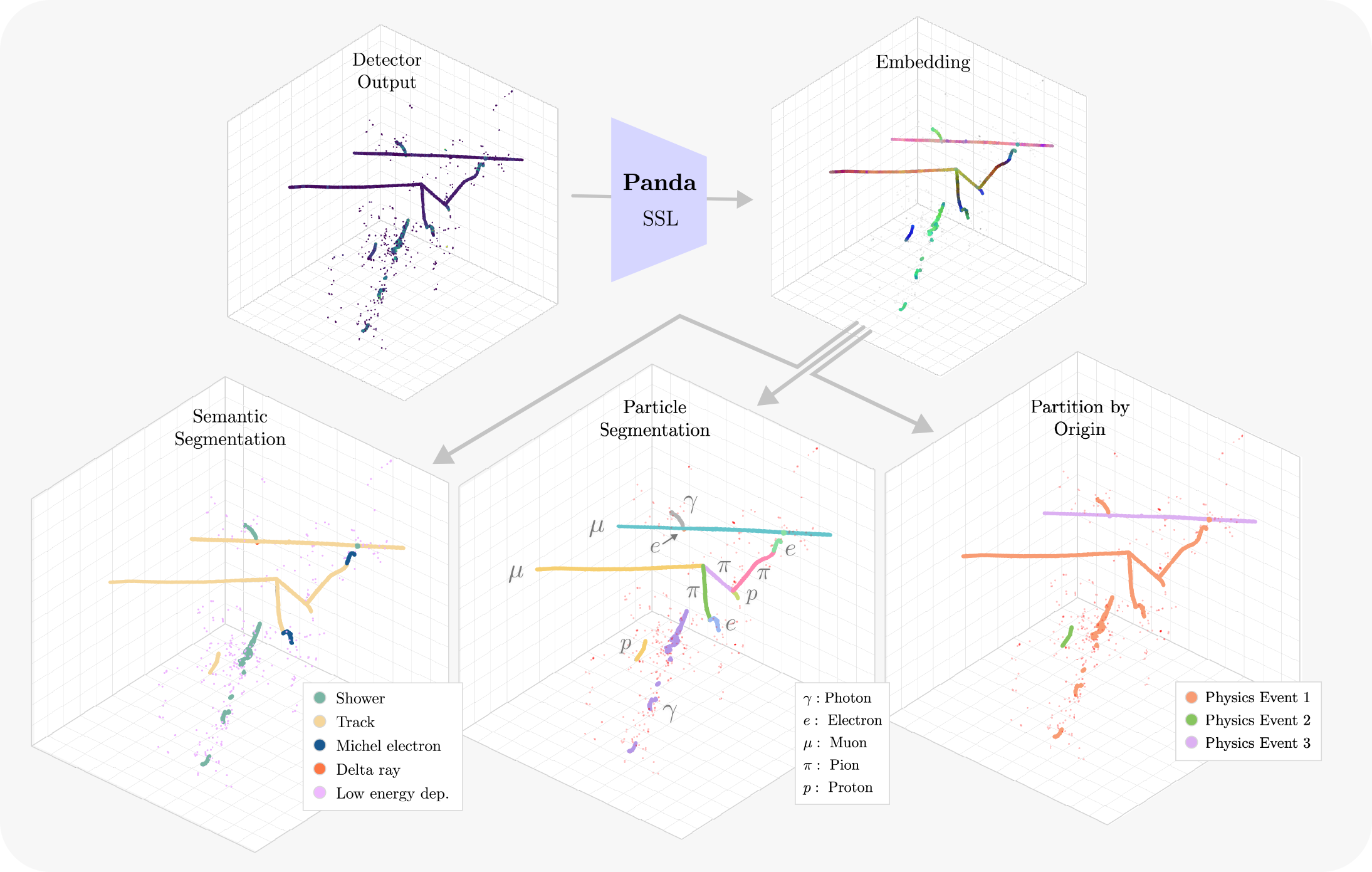
This repository holds the pretrained models, inference code and example notebooks of two papers. Panda V1 learns reusable representations of liquid argon time projection chamber (LArTPC) images by self-distillation. Panda V2 refines the encoder, the pretraining objective and the fine-tuning recipe, and we apply it independently to four detectors: a LArTPC, the sPHENIX collider TPC, a water Cherenkov detector and the NEXT high-pressure xenon TPC. The code that trains and evaluates both models is in pimm.
Samuel Young, César Jesús-Valls, Omar A. Alterkait, Gregor Krzmanc, Kazuhiro Terao
[Tutorial] [BibTeX]

We pretrain the same Panda V2 encoder with the same self-distillation recipe on each detector's own unlabeled events. In the figure, each point is one detector measurement, coloured by its measured signal (upper left of each view) or by the encoder's features projected to RGB with PCA (lower right). With the encoder frozen, small heads trained on few labeled events match or outperform prior methods at the level of hits, objects and whole images.
Samuel Young, Kazuhiro Terao
[Paper] [Dataset] [Project Site] [Tutorial] [BibTeX]
- Installation
- Panda V2: models and datasets
- Panda V2: quick start
- Panda V1: dataset and quick start
- Citation
This repo provides two ways of installation: standalone mode and package mode.
The provided GPU environments assume Python 3.10.12 or newer in the 3.10 series, Linux x86-64, and CUDA 12.x. Panda V2 uses the attention kernels, dataset readers and preprocessing of the particle-imaging-models package (pimm), which both modes install. pimm needs torch-scatter, whose prebuilt wheels for PyTorch 2.10 and CUDA 12.6 are on PyG's index, so the pip commands below point to it.
-
The standalone mode is recommended for quick inference, visualization, and running the demo notebooks.
uv
If you haven't already, install uv via running
curl -LsSf https://astral.sh/uv/install.sh | sh. Then,git clone https://github.com/DeepLearnPhysics/Panda.git && cd Panda uv sync # optionally with Flash Attention (Ampere+ GPUs) uv sync --extra flash
Conda
# run `unset CUDA_PATH` first if it points to another CUDA installation. conda env create -f environment.yml --verbose conda activate panda -
The package mode installs Panda directly into the current environment from GitHub.
uv
uv pip install "panda @ git+https://github.com/DeepLearnPhysics/Panda.git" \
  --extra-index-url https://download.pytorch.org/whl/cu126 --find-links https://data.pyg.org/whl/torch-2.10.0+cu126.html

# optionally with FlashAttention (Ampere+ GPUs)
uv pip install "panda[flash] @ git+https://github.com/DeepLearnPhysics/Panda.git" \
  --extra-index-url https://download.pytorch.org/whl/cu126 --find-links https://data.pyg.org/whl/torch-2.10.0+cu126.html
Conda
conda activate <environment>
pip install "panda @ git+https://github.com/DeepLearnPhysics/Panda.git" \
  --extra-index-url https://download.pytorch.org/whl/cu126 --find-links https://data.pyg.org/whl/torch-2.10.0+cu126.html

# optionally with FlashAttention (Ampere+ GPUs)
pip install "panda[flash] @ git+https://github.com/DeepLearnPhysics/Panda.git" \
  --extra-index-url https://download.pytorch.org/whl/cu126 --find-links https://data.pyg.org/whl/torch-2.10.0+cu126.html
Panda V2 also runs on GPUs without FlashAttention, such as the RTX 2080 Ti. FlashAttention is used where it is installed and PyTorch's attention elsewhere; pass attention="torch" to panda.load to choose PyTorch's attention yourself.
Each detector has one dataset on the Hugging Face Hub, and we name every model after the data it was trained on (DeepLearnPhysics/<model>.<data>). Each dataset is downloaded the first time you use it.
| Detector | Dataset | Panda loader | Transform |
|---|---|---|---|
| LArTPC | PILArNet-M (revision v3_extra) |
panda.v2.PILArNetDataset |
"lartpc", "lartpc-semseg" |
| sPHENIX TPC | tpcpp-10m, a mirror of TPCpp-10M |
panda.v2.TPCpp10MDataset |
"sphenix", "sphenix-semseg" |
| Water Cherenkov | wand-sk-like, released with this paper |
panda.v2.WANDSKLikeDataset |
"wc" |
| NEXT | next-aiss, a mirror of the NEXT AI summer school release |
panda.v2.NEXTAISSDataset |
"next" |
| Model | Data | Task |
|---|---|---|
panda-v2.<data> |
pilarnet-m, tpcpp-10m, wand-sk-like, next-aiss |
pretrained encoder; the tags 01-of-40 to 40-of-40 are 40 snapshots taken during pretraining |
panda-v2-instance.<data> |
pilarnet-m, tpcpp-10m, wand-sk-like |
instance segmentation (particles; interactions on the LArTPC; Cherenkov rings with their kinematics on the water Cherenkov detector) |
panda-v2-semseg.<data> |
pilarnet-m, tpcpp-10m |
semantic segmentation |
panda-v2-cls.next-aiss |
next-aiss |
0νββ signal against ²¹⁴Bi background |
panda-v2-instance.<source>_ft_<target>-1k |
<source>: any of the four; <target>: pilarnet-m, tpcpp-10m, wand-sk-like |
instance segmentation on <target> with the encoder pretrained on <source>, fine-tuned on 1,000 events |
We fine-tuned the encoder with LoRA and keep the adapters separate from the pretrained weights, so inside with panda.v2.lora_disabled(model): a fine-tuned model runs with its pretrained encoder alone.
import torch
from pimm.datasets.utils import collate_fn

import panda

# pretrained encoder and the test events it was evaluated on, preprocessed as in training
encoder = panda.load("panda-v2.pilarnet-m").cuda()
dataset = panda.v2.PILArNetDataset(split="test", transform=panda.v2.transform("lartpc"))
batch = {k: v.cuda() if torch.is_tensor(v) else v for k, v in collate_fn([dataset[0]]).items()}

with torch.no_grad():
    point = encoder(batch)          # the coarsest stage, with its pooling chain
    feat = point.upcast().feat      # one row per input voxel, 1170 features
Call a fine-tuned model the same way, and pass its outputs to postprocess for the predictions:
model = panda.load("panda-v2-instance.pilarnet-m").cuda()
with torch.no_grad():
    predictions = model.postprocess(model(batch))
In the notebooks in notebooks_v2, we go through each detector: its dataset and labels, the encoder's features with a linear probe, and the fine-tuned models.
We use the PILArNet-M dataset (~168 GB), which can be downloaded directly from HuggingFace:
import panda

# auto-download and create dataset
# dataset is cached in `data_root`, which defaults to `~/.cache/pilarnet`
dataset = panda.PILArNetH5Dataset(split="all", data_root=...)

# or download manually first
data_root = panda.download_pilarnet(split="all", data_root=...)
See DATASET.md for full documentation on dataset structure, labels, and more advanced usage.
-
Model. Load the pre-trained model by running the following command:
# load the pre-trained model from Huggingface
# supported models: "base", "particle", "interaction", "semantic"
# ckpt is cached in ~/.cache/panda/ckpt, and the path can be customized by setting 'download_root'
import panda

model = panda.load("base").cuda()

# load the pre-trained model from local path
# assume the ckpt file is stored in the 'ckpt' folder
model = panda.load("ckpt/panda_base.pth").cuda()

# the ckpt file stores the config and state_dict of pretrained model
If FlashAttention is not available, you will get a warning message and the model will use native PyTorch attention. You can also manually set the
enable_flashflag to False in the config file to disable FlashAttention:model = panda.load("base", custom_config=dict(enable_flash=False)).cuda()
-
Inference. Run the inference by running the following command:
>>> EVENT_IDX = 0
>>> dataset = panda.PILArNetH5Dataset(split="test") # downloads ~7GB
>>> point = dataset[EVENT_IDX]
>>> for key in point.keys():
    if isinstance(point[key], torch.Tensor):
        point[key] = point[key].cuda(non_blocking=True)
>>> point = model(point)
>>> point.coord.shape, point.feat.shape, point.offset.shape
(torch.Size([1175, 3]), torch.Size([1175, 1232]), torch.Size([1]))
Full example notebooks for accessing the dataset, image encoding, particle and interaction clustering, and semantic segmentation can be found in notebooks.
If you find this work useful, please consider citing the papers:
@misc{young2026pandadiplomacy,
      title={Panda Diplomacy: Sensor-level Representation Learning across High-Energy and Nuclear Physics},
      author={Samuel Young and C\'esar Jes\'us-Valls and Omar A. Alterkait and Gregor Krzmanc and Kazuhiro Terao},
      year={2026},
}

@misc{young2025pandaselfdistillationreusablesensorlevel,
      title={Panda: Self-distillation of Reusable Sensor-level Representations for High Energy Physics},
      author={Samuel Young and Kazuhiro Terao},
      year={2025},
      eprint={2512.01324},
      archivePrefix={arXiv},
      primaryClass={hep-ex},
      url={https://arxiv.org/abs/2512.01324},
}
Please also cite the datasets you use; their citations are on each dataset's card on the Hub.
This repository is based on the Sonata paper's inference repository, which can be found here. Parts of this code, of which were taken from the original repository, are licensed under the Apache 2.0 license.
This work is supported by the U.S. Department of Energy, Office of Science, and Office of High Energy Physics under Contract No. DE-AC02-76SF00515.
Sam Young youngsam@stanford.edu.