


Pixel art GitHub profile cards with a medieval feel: a character sheet, a spellbook of your languages and a campfire for your streak. Paste one line into your profile README: no token, no workflow, no setup.
Website · Profile builder · All cards · Wiki · Status · Privacy

| Card | Shows |
|---|---|
/stats |
level (from lifetime contributions), commits, PRs, repos, stars, issues, reviews, followers, contributions |
/languages |
your top five languages, each with its own rune |
/streak |
current and best streak, total contributions; the fire grows with your streak |
Open the profile builder and pick what you're decorating:
- A GitHub profile: type your login. The builder starts from your profile README; add cards one at a time or start from a template (Simple, Some details, The most detailed), click any card to change it, then copy the result.
- Something else (a website, a blog, any Markdown file): no login needed, and you get the decorations.
A short tour shows you around the first time. Undo and Start over let you back out of any change.
All cards shows every card in every scene, by day and night, in fine and chunky pixels, plus the decorations. Click one to preview it and copy its address.
Or write it yourself, one line per card:
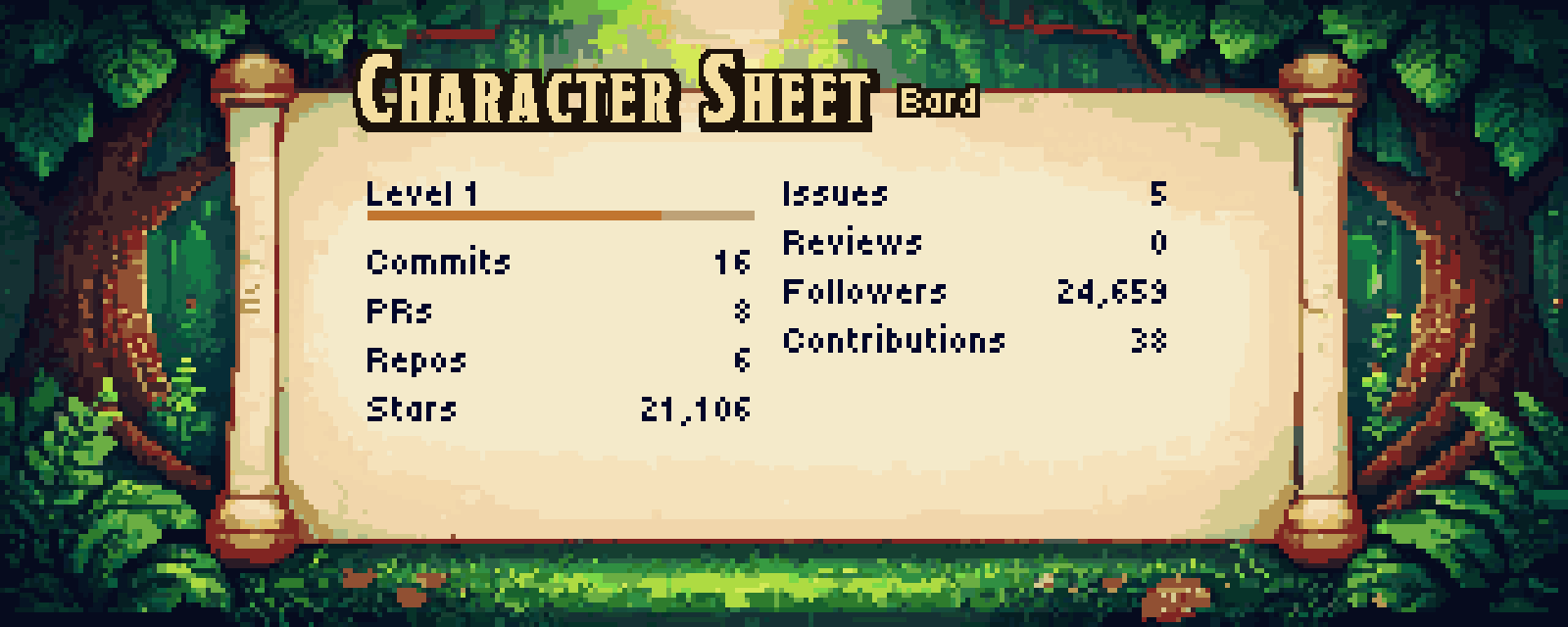The address reads /<login>/<card>/<scene>/<time>, and the last two are optional: https://questlog.cc/octocat/streak/forest-misty/night. Every other option goes after a ?, e.g. https://questlog.cc/octocat/languages/castle?langs=3. The longer form https://questlog.cc/stats?user=octocat&scene=castle works too.
To switch to the night painting for readers in dark mode, use GitHub's <picture> tag instead:
<picture>
  <source media="(prefers-color-scheme: dark)" srcset="https://questlog.cc/octocat/stats/forest/night">
  <img alt="octocat's stats" src="https://questlog.cc/octocat/stats">
</picture>
The first time a card is requested you'll see a "the scribe is inking your sheet" card for a few seconds while your stats are fetched. Refresh and it's there. Cards update every 12 hours. If GitHub's hourly limit is ever reached, the card says how many minutes the wait is. questlog.cc/status shows whether the service is up and letting new users in.
Sixteen scenes in four themes. Every scene has all three cards, by day and by night, painted to match each other, so a profile that uses one scene throughout looks like one place.

| Theme | scene= |
|---|---|
| Forest | forest (default), forest-autumn, forest-misty, forest-moonlit |
| Castle | castle, castle-aurora, castle-sky, castle-storm |
| Cozy | fairy-garden, witch-cottage, cloud-kingdom, rose-garden |
| Scholarly | royal-library, war-room, guild-hall, observatory |
The gallery shows each scene's Character Sheet in the order of the table.
Painted banners to head a section of your README or divide two, with an optional title in the card title style. They show no stats, so they need no login. Like the cards, each one is painted by day and by night.

To switch to the night painting for readers in dark mode, add time=night to the dark source:
<picture>
  <source media="(prefers-color-scheme: dark)" srcset="https://questlog.cc/decorations/reading-nook?title=About%20Me&time=night">
  <img alt="About Me" src="https://questlog.cc/decorations/reading-nook?title=About%20Me">
</picture>| Decoration | Painting |
|---|---|
reading-nook |
a candlelit lectern in the forest; title on the right |
workbench |
a table under a great tree's roots; title in the middle |
raven-moon |
a raven before the moon; title on the left |
enchanted-clearing |
a glowing gate between old trees; title at the top |
crystal-owl |
an owl on a mossy pillar at sunset, by a flickering lantern; title on the left |
forest-divider |
a mossy log, lower than the others; no title unless you give one |
forest-footer |
glowing mushrooms and ferns, as low as the divider; for the end of a README |
Decorations take only title, title_color, outline_color, truncate, animate, scale, time (time=night for the night painting) and pixels; any other option draws an error card.
| Parameter | Values | Default |
|---|---|---|
user |
your GitHub login | required |
scene |
any scene above | forest |
time |
day, night |
day |
pixels |
fine, chunky: chunky draws the painting in pixels twice as big; text, bars and fire stay sharp |
fine |
title |
any text, up to 60 characters | the scene's title |
subtitle |
any text, up to 60 characters | /stats: a class from your top language; none on the others |
labels |
key:Text,key:Text, e.g. commits:Deeds; keys below |
the scene's labels |
values |
key:Text,key:Text, e.g. level:Archmage; keys below. Replaces the drawn value; bars, notches and the fire still follow your real numbers |
your numbers |
note |
up to 2 lines split by |, e.g. Open to work|DMs open |
none |
title_color |
hex RRGGBB or RGB, # optional (write it as %23), e.g. FFD700 |
the scene's ink |
text_color |
hex, as above; colors every other text | the scene's ink |
outline_color |
hex, as above; the dark edge around outlined text | the scene's ink |
fire |
classic, themed: on /streak, themed draws the scene's own fire colors |
classic |
langs |
3, 5: how many languages /languages lists |
5 |
hide |
comma list, e.g. prs,stars or html,css on /languages |
none |
truncate |
true, false: false draws a long subtitle whole instead of trimming it with "..." (it may then run past the page) |
true |
animate |
true, false |
true |
scale |
1 to 5, the output size (320×128 times this) |
5 |
Keys are case-insensitive. At most 20 pairs in labels and in values, keys up to 20 characters, any text up to 60 characters; text that does not fit its place is trimmed with "...".
| Card | labels keys |
values keys |
|---|---|---|
/stats |
level, commits, prs, repos, stars, issues, reviews, followers, contributions |
the same |
/languages |
any language name, e.g. typescript, c%23 (C#), c%2B%2B (C++), jupyter notebook; percent (the % after each share); empty (the text for an account with no languages) |
any language name; replaces that row's percent |
/streak |
current, best, total, days (the unit after current and best) |
current, best, total; replaces the whole value, unit included |
A note goes where the card has room: under the rows on /stats, across both columns when the whole note fits there and under the right column otherwise; under the language rows on /languages, where each note line takes the place of the last row, and beside the fire on /streak. Hiding rows with hide makes more room. A color that is not valid hex draws an error card, like any other bad option.
Only public data is shown. Private contributions count if you've enabled "Include private contributions" in your GitHub profile settings.
questlog sets no cookies and runs no analytics or ads. To draw your cards it keeps your public GitHub numbers (refreshed every 12 hours) and a list of the card addresses used with your login, so its owner can see who uses it. questlog.cc/privacy lists everything it keeps and for how long. To have your login removed, write to contact@cevdetbaran.com: your saved data is deleted, and your cards stop showing your stats.
docker build -t questlog .
docker run -d -p 8080:8080 --env-file .env -v questlog-data:/data questlog
A self-hosted instance must credit the paintings as "questlog by Cevdet Baran Oral", linked to https://questlog.cc, on the pages that show the cards and in its README (see ART-LICENSE.md); it can run under its own address.
.env holds GITHUB_TOKEN= with a fine-grained token that can read public repositories (see .env.example). NEW_LOGINS_PER_HOUR (600 by default) caps how many logins are fetched for the first time each hour; raise it for a busy day, GitHub's own limit still pauses fetching when it runs low. The server listens on PORT (8080) and keeps its cache in DATA_DIR (/data). With your own token, your own instance can count your private contributions too.
Watching it. The server writes one plain line per request and per background event to stderr (docker logs questlog): what was asked, whether the card came from the memory cache, the disk cache or was drawn (and how long that took), each GitHub fetch with the quota left, queue decisions, and a status line every 15 minutes. Client IPs are never written; the Cloudflare ray id links a line to Cloudflare's own logs. /status and /health show the public state (up, whether GitHub fetching runs, whether new users get in, with times in UTC). /admin/status and /admin/health show every count and capacity, the last hour's traffic and the latest log lines. Put them behind a Cloudflare Access app and set ACCESS_TEAM_DOMAIN, ACCESS_AUD and ADMIN_EMAILS (see .env.example): the server then checks the login token Access signs on every request, so the pages stay closed even if someone reaches the server another way. Without those settings they open only for a local run.
People. The admin page also lists who has used the instance: each GitHub login whose card a person's browser or GitHub's image proxy received, with its saved stats and the card addresses it used. Decorations made without a login are only counted. Bots, the owner and the example logins are left out, and no IPs are saved. The list lives in people.json in DATA_DIR and forgets a login 12 months after its last visit. Remove deletes a login's saved stats, stops fetching it, and makes its cards say they're not shown. Allow undoes that.
The pages at /, /builder, /cards, /wiki, /status, /privacy and /admin/status come from site/, a Next.js static export that the binary embeds. Build it before cargo build: cd site && npm ci && npm run build (it writes static/).
The cards on those pages are not drawn live: the site ships its own WebP copies in site/public/cards/. After a change to the art or the drawing, build the site, run a local server of the new build, draw the copies again with uv run site/scripts/snap_cards.py http://127.0.0.1:8080, then build the site once more.
Bug reports, ideas and pull requests are welcome; CONTRIBUTING.md explains how to run it and test a change. Please report security problems privately, as SECURITY.md describes. Changes are listed in CHANGELOG.md.
The code and the art have different licenses.
- Code: MIT (see
LICENSE). Use it, change it, self-host it. - Art: © Cevdet Baran Oral, CC BY-NC 4.0 (see
ART-LICENSE.md). This covers the paintings and sprites inart/andassets/, and the cards drawn from them.- Free for non-commercial use, such as cards on your own GitHub profile. Cards from questlog.cc need no credit line in your README.
- A self-hosted instance keeps the credit "questlog by Cevdet Baran Oral", linked to questlog.cc.
- Commercial use needs written permission, and that includes a commercial self-hosted instance. Ask at contact@cevdetbaran.com.
- Fonts: their own licenses (see
fonts/README.md).